



Table of Contents
Two weeks ago, on a call with a friend, the line came up that I’ve been hearing in different formats since early this year:
“I have four teams building agents in parallel. Two months ago I discovered two of them were doing the same thing. The worst part: none of them have the same guardrails.”
This isn’t the first time. The conversation repeats with predictable variations across platform leads at several Latin American companies I’ve been working with: the first wave of corporate agents showed up squad by squad, with no coordination, and now somebody has to bring order before the list goes from 8 agents to 50.
If you’re on the “we haven’t hit 8 yet” side, good news: AWS rolled out in preview the service you needed six months ago. On April 9, 2026 they announced AWS Agent Registry, a private catalog for your organization where agents, MCP servers, skills, and custom resources are published with a pluggable approval workflow. If you’re on the “I have 50 agents and a hand-drawn Confluence map” side, also good news: the path to migrate to the Registry starts the day your organization understands what comes next.
This post is the result of spending the last week standing up an end-to-end lab in my account — from Terraform IAM to Claude Code connected to the Registry over MCP — and documenting the twelve real gotchas that came up along the way (eleven from today’s API plus one from the upstream A2A spec already on the horizon). Some are subtle. Four of them will make your first create_registry_record fail in a non-obvious way. I flag them so you don’t waste the time I wasted.
🔄 Update (September 2026): AWS Agent Registry reached general availability (GA) on August 31, 2026, per the official announcement. Everything that follows describes the service’s behavior in preview (April 2026), and the Aurora Capital lab remains valid as-is — the 12 API gotchas didn’t change with GA. What did change: there’s real pricing now (see the cost FAQ below), and GA closed three of the five gaps I document in “What isn’t here yet” (IaC support, cross-account federation, runtime auto-indexing) — flagged inline where relevant. Regions stayed the same, 5 total.
🎯 ProTip #1: Agent governance is a day-1 decision, not a day-100 one. The gap between “good thing we put a catalog in place” and “now we have to retroactively migrate 47 agents into the catalog” is measured in lost person-weeks. The service already exists; the adoption case is overwhelming.
If you’re coming from my last post — the benchmark of 5 chunking strategies in Bedrock Knowledge Bases — the angle here is different. There the ideal reader was the developer iterating on RAG. Here it’s whoever steps on the brake before the sprawl becomes irreversible: CTOs, platform leads, and architects watching the agent inventory grow and understanding that without a catalog they’ll end up reinventing ServiceCatalog from scratch, worse.
The real cost of the duplicate agent
When you hear “duplication,” you might picture two developers writing the same code. The reality of agent duplication is worse: two separate pipelines burning Bedrock budget, two sets of IAM roles nobody audits, two Jira integrations contradicting each other when the same ticket travels through both, and the uncertainty of not knowing which one is the “official” one when a production incident hits.
Multiply that by an organization with seven squads and the first wave of GenAI adoption:
- Squad SRE builds an incident triage agent that calls Jira.
- Squad Customer Lifecycle builds an onboarding agent that also calls Jira to create KYC tickets.
- Squad Billing builds an MCP server for Stripe that internally reuses a PII redaction function that already existed as a standalone tool in the Compliance team.
- Squad Data has an Athena wrapper the Analytics team can’t find and rebuilds with free-form SQL, opening a security hole the first one had already closed.
Each individual decision was rational. Added together, they’re a governance nightmare. And no Jira ticket is going to retroactively coordinate this — by the time the problem is visible, you already have to write a migration program with its own backlog.
The question isn’t whether you need an agent catalog. It’s whether you put it in when you can (8 agents) or when you must (50).
AWS Agent Registry, in two minutes
Agent Registry lives under the Discover section in the AgentCore console — not under Build or Test. That placement says something: AWS is positioning the Registry as a discovery service, not a build one. It’s a UX detail that predicts how the product will evolve: future integration with Runtime and Gateway is probably automatic (a deployed agent self-indexes), but it isn’t today. For now, everything is manual.
What you catalog:
- MCP servers — validated against the official MCP schema. The MCP servers your client agent needs to know exist.
- Agents — validated against the A2A AgentCard schema. Corporate agents that other agents can invoke.
- Skills — reusable capabilities (Python packages, libraries) with their own metadata plus markdown docs.
- Custom resources — any JSON you define. The escape hatch for Lambda tools, internal HTTPS endpoints, or anything that doesn’t fit MCP, A2A, or Skill.
Each record lives an approval cycle:
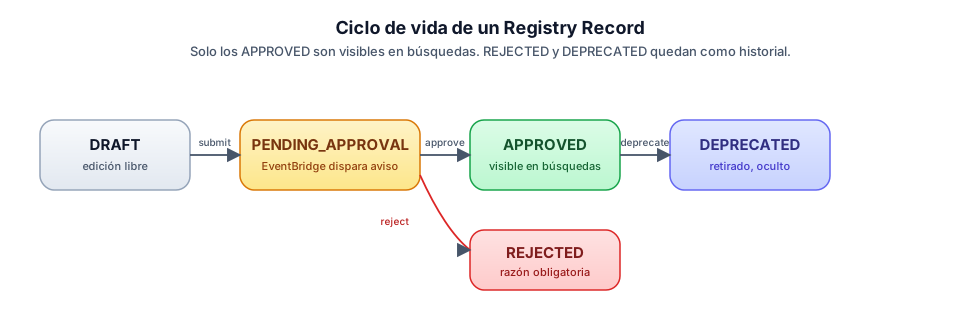
Only APPROVED records appear in searches. REJECTED and DEPRECATED ones are kept as history but are invisible to consumers.
Cost during preview: zero. When it goes to general availability (GA), there will be a price per “Net Records” (records alive at any moment; deleting one decrements the count). EventBridge, SNS, and IAM have their normal pricing and amount to cents per month for a lab.
🔄 Update (September 2026): With GA (August 31, 2026) pricing is now real, as expected: Net Records + discovery API calls, with a monthly Free Tier of 5,000 Net Records, 1,000,000 Search calls, and 2,000,000 combined Get+List calls — see the official pricing page. A lab the size of this article’s (8 records, a handful of searches) stays comfortably inside the Free Tier.
Preview regions (five): us-east-1, us-west-2, ap-southeast-2, ap-northeast-1, eu-west-1.
🔄 Update (September 2026): GA didn’t expand regional coverage — still the same five. Always check the official regions table.
API surface (control plane plus data plane):
| Plane | Key actions |
|---|---|
bedrock-agentcore-control |
CreateRegistry, CreateRegistryRecord, SubmitRegistryRecordForApproval, UpdateRegistryRecordStatus |
bedrock-agentcore |
SearchRegistryRecords, MCP endpoint HTTP path-based |
boto3 ≥ 1.42.87 is required; if your SDK is older, the methods don’t exist. AWS CLI arrived late: the bedrock-agentcore-control and bedrock-agentcore services landed in AWS CLI v2 ≥ 2.34.28. If running aws bedrock-agentcore-control list-registries returns Found invalid choice, run aws --version and bump to 2.34.28 or later. boto3 has them from the start (≥ 1.42.87), so for fast iteration during preview the simplest path is Python.
The four personas: the backbone of the model
What grabbed my attention while reading the Registry’s IAM docs was that AWS explicitly names four personas. It isn’t marketing — it’s a direct map to separate IAM policies, and it’s the first time in AgentCore that role separation is this clean.
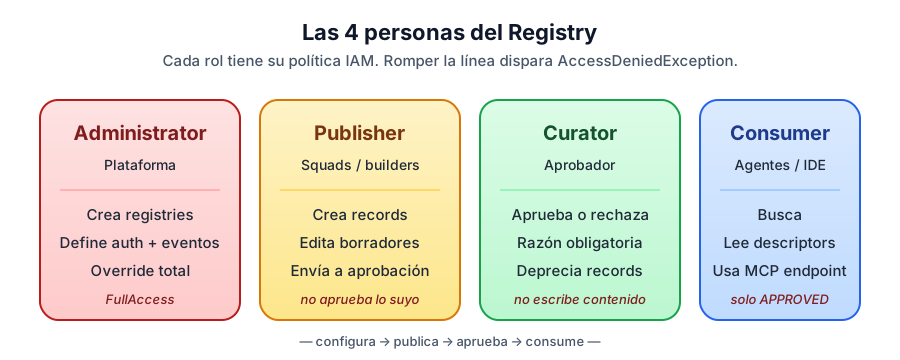
Administrator. The owner of the Registry’s infrastructure. Creates registries, defines authentication (IAM or JWT), hooks up EventBridge for approval automation, decides whether auto-approval is enabled (always off in production). Has full access — including the ability to manually approve or reject any record without going through the Curator.
Publisher. The builder inside squads. Creates registry records describing their resources, iterates on them in DRAFT state, and submits them for approval when ready. What they cannot do (and you’ll see real AccessDenied if they try): approve their own records, delete registries, not even delete their own published records.
Curator (or Approver). The quality gatekeeper. Receives records in pending approval state — via email, Slack, or ticket depending on how you wire EventBridge — evaluates against organizational standards, and approves or rejects with a mandatory reason. Also deprecates records that are no longer used. What they cannot do: create or modify the content of a record. Their only superpower is deciding state transitions.
Consumer. Anyone searching for resources to use. Only sees APPROVED records. By default operates against the data plane (Search plus MCP endpoint). Their role is the most restricted and the most interesting: when you connect Claude Code or any client agent to the Registry, the credentials signing each request belong to the Consumer role.
This separation seems obvious until you try to implement it. When you wire up the inline policies with minimum scope persona by persona, you’ll hit the lab’s first finding — and it’s one the documentation doesn’t warn you about.
Hands-on: the Aurora Capital lab
To ground all of this I built a lab that simulates a fictional Latin American fintech called Aurora Capital, with seven squads and the first wave of corporate agents. The organization is built with enough specificity that the demos don’t feel toy-grade: real currencies (MXN, COP, ARS, BRL, CLP, PEN), squads with identifiable owners, and plausible use cases where duplication is imminent.
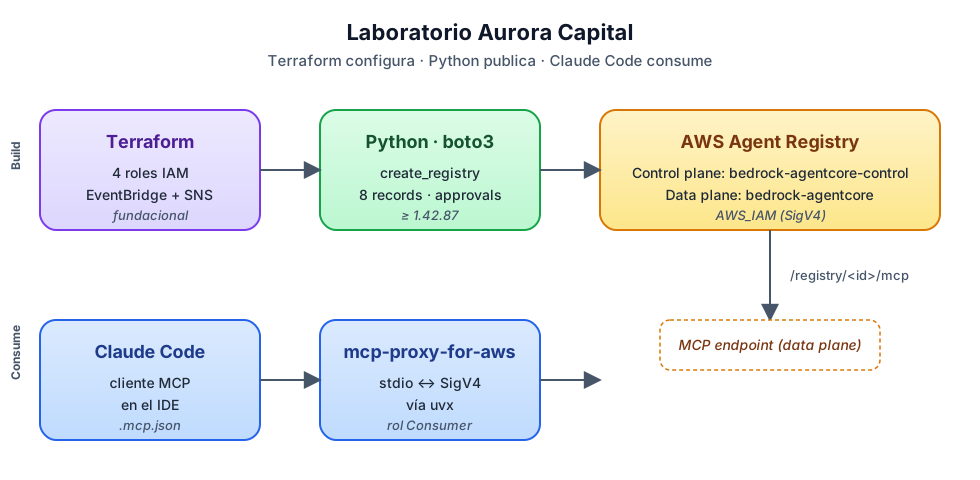
The eight catalog records:
| # | Type | Resource | Owner |
|---|---|---|---|
| 1 | MCP server | jira-mcp-server |
Squad SRE |
| 2 | MCP server | stripe-payments-mcp |
Squad Billing |
| 3 | A2A Agent | incident-triage-agent |
Squad SRE |
| 4 | A2A Agent | customer-onboarding-agent |
Squad Customer Lifecycle |
| 5 | Skill | pii-redaction-skill |
Squad Compliance |
| 6 | Skill | currency-conversion-skill |
Squad Treasury |
| 7 | Custom | athena-query-tool |
Squad Data |
| 8 | Custom | slack-notifier-tool |
Squad Platform |
And the demo dynamic: slack-notifier-tool will be rejected by the Curator because its mTLS endpoint isn’t in the documented internal-tools catalog. The other seven move to APPROVED and become discoverable.
The technical stack I built has two clear parts:
- Terraform creates the 4 IAM roles (one per persona), an SNS topic with email subscription, and an EventBridge rule that captures
SubmitRegistryRecordForApprovaland notifies the Curator. - Python (boto3) creates the registry and the records, and runs submissions, approvals, and searches.
Why not Terraform for the Registry? Because as of April 28, 2026, neither hashicorp/aws (v6.42.0) nor hashicorp/awscc (v1.81.0) has aws_bedrockagentcore_registry or _record. The AWS Provider has 12 AgentCore resources (runtime, gateway, browser, code interpreter, memory, etc.) but Registry isn’t there yet. That tells you exactly how new this is: the API shape is still stabilizing.
🚨 ProTip #2: If your organization’s rule is “everything in Terraform or nothing,” the Registry doesn’t qualify yet. The healthy way to adopt it during preview is to keep IAM and EventBridge in Terraform (where they’re foundational and aren’t going to change) and handle the Registry from Python or the console until the provider supports it. Don’t pollute your codebase with a hasty
local-exec.
🔄 Update (September 2026): This gap closed with GA. The general availability announcement confirms official support for provisioning and managing registries as code with AWS CloudFormation, Terraform, and AWS CDK. If you’re picking this lab back up today, it’s worth migrating the Python part (registry and record creation) to your usual IaC instead of keeping the ProTip #2 workaround — check the provider’s minimum version in the Terraform registry before migrating.
The first IAM clash (which the docs don’t anticipate)
With the 4 roles set up using inline policies that have exactly each persona’s permissions, I fired off the first create_registry:
control = boto3.client("bedrock-agentcore-control")
resp = control.create_registry(
    name="aurora-capital-prod",
    description="Aurora Capital — corporate agent registry",
)
print(resp["registryArn"])
# → arn:aws:bedrock-agentcore:us-east-1:123456789012:registry/aurora-capital-prod
print(resp["status"])
# → CREATING
API response 200 OK. Status CREATING, as expected. A minute later, get_registry:
{
  "name": "aurora-capital-prod",
  "status": "CREATE_FAILED",
  "statusReason": "Unable to create workload identity because access was denied."
}
CREATE_FAILED. Access denied for what? The CloudTrail entry clarifies it: internally, the Registry provisions a workload identity associated with the registry, and that creation is performed with the caller’s credentials (my Admin role). The Admin role with an inline policy of just bedrock-agentcore:*Registry* doesn’t have enough permissions — internal AgentCore actions plus IAM PassRole plus some Secrets Manager and KMS for the workload identity are missing.
The right fix is the official managed policy:
resource "aws_iam_role_policy_attachment" "admin_full_access" {
  role       = aws_iam_role.admin.name
  policy_arn = "arn:aws:iam::aws:policy/BedrockAgentCoreFullAccess"
}
BedrockAgentCoreFullAccess includes: bedrock-agentcore:* over any ARN, IAM GetRole/ListRoles/PassRole (the latter limited to roles *BedrockAgentCore* with condition iam:PassedToService = bedrock-agentcore.amazonaws.com), Secrets Manager for secrets prefixed bedrock-agentcore*, and KMS conditioned on aws:CalledVia = bedrock-agentcore.amazonaws.com.
⚠️ ProTip #3: The minimum-scope inline policy works perfectly for Publisher, Curator, and Consumer — those AccessDenied errors in the governance demo are real and they hold. But the role that runs
CreateRegistryneedsBedrockAgentCoreFullAccess. The “Get Started” docs use this managed policy in the examples without flagging why; when you try to be more restrictive, the API responds 200 and the registry sits dead inCREATE_FAILED. It’s a deceptive pattern worth knowing in advance.
And a second related subtlety, this time around Terraform and SSO:
data "aws_caller_identity" "current" {}
# Si corrés desde una sesión SSO, devuelve:
# arn:aws:sts::123456789012:assumed-role/AWSReservedSSO_AdministratorAccess_31df6209ac649496/gerardo.arroyo
If you use that literal ARN as the Principal in the trust policy of your 4 roles, IAM may reject it (MalformedPolicyDocument) or accept it and leave you with a principal tied to a session name that changes between logins. You have to derive the permanent IAM role from the SSO permission set. I solved it with a Terraform local that detects SSO and translates:
locals {
  _caller_arn = data.aws_caller_identity.current.arn
  _is_sso     = startswith(split("/", local._caller_arn)[1], "AWSReservedSSO_")

  caller_role_arn = local._is_sso ? format(
    "arn:aws:iam::%s:role/aws-reserved/sso.amazonaws.com/%s",
    data.aws_caller_identity.current.account_id,
    split("/", local._caller_arn)[1]
  ) : local._caller_arn
}
With the right Admin policy and the trust policies pointing to the permanent SSO role, create_registry now finishes in READY in under a minute:

Status Ready, auth type AWS_IAM, ARN visible. Now we can publish records.
Four descriptors, four shapes (and only one is well documented)
We arrive at the lab’s richest finding: no Registry descriptor has the “obvious” shape. MCP is the only one confirmed against official docs and works on the first try. The other three — A2A, Skill, Custom — have shapes you only discover when your first create_registry_record fails. Three error iterations later, you reach the right shape.
Here are the four, with the shape that works in production and the error you would have eaten if you came in with the natural inference.
MCP — the only well-documented one
control.create_registry_record(
    registryId=registry_id,
    name="stripe-payments-mcp",
    descriptorType="MCP",
    descriptors={
        "mcp": {
            "server": {"inlineContent": json.dumps({
                "name": "auroracapital/stripe-payments-mcp",
                "description": "Payment operations against Stripe",
                "version": "2.1.0"
            })},
            "tools": {"inlineContent": json.dumps({
                "tools": [
                    {"name": "create_payment_intent", "description": "...", "inputSchema": {...}},
                    {"name": "issue_refund", "description": "...", "inputSchema": {...}},
                ]
            })}
        }
    },
    recordVersion="2.1",
)
server is required, tools is optional. Both go with inlineContent, which is a serialized JSON string. Confirmed against official docs — no surprises with MCP.
A2A — missing protocolVersion
My initial inference of the A2A AgentCard didn’t include a field the Registry requires. The actual error:
ValidationException: a2a.agentCard inlineContent does not match any supported version
The message doesn’t mention which field is missing, only “does not match any supported version.” The field is protocolVersion, it goes at the top of the AgentCard, and it’s required:
agent_card = {
    "protocolVersion": "0.3.0",   # ← required, easy to forget
    "name": "auroracapital/customer-onboarding-agent",
    "description": "End-to-end onboarding of new retail customers",
    "version": "1.2.0",
    "url": "https://agents.aurora-capital.internal/onboarding",
    "capabilities": {"streaming": True, "pushNotifications": True},
    "defaultInputModes": ["text", "image"],
    "skills": [...],
}

descriptors = {"a2a": {"agentCard": {"inlineContent": json.dumps(agent_card)}}}
The Registry follows the open A2A specification, where protocolVersion is required. If you build the AgentCard by hand (instead of generating it from an official A2A SDK), it’s easy to skip.
⏳ A version detail worth knowing: the upstream A2A spec already shipped v1.0.0 and moved
protocolVersionfrom the top level of the AgentCard tosupportedInterfaces[].protocolVersion. The Registry today validates against the previous shape (protocolVersionat the top level with values like0.3.0), so if you copy an AgentCard generated with an A2A SDK v1.0 you’ll eatValidationException. Until AWS updates the supported schema, the path that works is the one in this post: top level +0.3.0.
Skill — four surprises in one descriptor
This is the champion of sequential errors. My initial inference clashed four times before reaching the right shape.
Surprise 1: the key is NOT skill. Botocore cuts you off before the API call:
ParamValidationError: Unknown parameter in descriptors: "skill",
must be one of: mcp, a2a, custom, agentSkills
The right key is agentSkills in the plural. Fine.
Surprise 2: inside, you don’t put inlineContent directly. There are specific sub-keys:
ParamValidationError: Unknown parameter in descriptors.agentSkills: "inlineContent",
must be one of: skillMd, skillDefinition
The valid sub-keys are skillDefinition (structured JSON with metadata and package info) and skillMd (markdown with documentation). And the descriptor accepts both at once — in fact, the recommendation is to send both because search indexes both sides.
Surprise 3: the API’s descriptorType enum is also different. I tried descriptorType="SKILL":
ValidationException: Value at 'descriptorType' failed to satisfy constraint:
Member must satisfy enum value set: [A2A, CUSTOM, MCP, AGENT_SKILLS]
The enum is AGENT_SKILLS (plural, with underscore), not SKILL. The inconsistency between the sub-key (agentSkills, camelCase) and the descriptorType enum (AGENT_SKILLS, uppercase with underscore) is unfortunate but you have to know it.
Surprise 4: the skillMd requires YAML frontmatter at the start. I sent plain markdown:
ValidationException: agentSkills.skillMd inlineContent must start with frontmatter
delimited by '---'
Your skillMd has to start with ---\n<YAML>\n---\n before the markdown body. If you come from the Jekyll world, this looks familiar — it’s exactly the pattern.
The final shape that works, after the four iterations:
control.create_registry_record(
    registryId=registry_id,
    name="pii-redaction-skill",
    descriptorType="AGENT_SKILLS",        # ← plural and uppercase
    descriptors={
        "agentSkills": {                  # ← plural and camelCase
            "skillDefinition": {
                "inlineContent": json.dumps({
                    "name": "pii-redaction",
                    "title": "PII Redaction Skill",
                    "version": "1.0.0",
                    "owner": "compliance@aurora-capital.internal",
                    "tags": ["compliance", "privacy", "pii", "redaction", "latam"],
                    "package": {
                        "type": "python",
                        "name": "aurora-pii-redaction",
                        "registry": "https://artifactory.aurora-capital.internal/pypi/",
                        "version": "1.0.0",
                    },
                })
            },
            "skillMd": {
                "inlineContent": (
                    "---\n"
                    "name: pii-redaction\n"
                    "version: 1.0.0\n"
                    "---\n\n"
                    "# PII Redaction Skill\n\n"
                    "Library that applies regex + ML rules..."
                )
            },
        }
    },
    recordVersion="1.0",
)
🔧 ProTip #4: Of the Registry’s four descriptors, only MCP works on the first try. A2A asks for
protocolVersionwith a cryptic error, AGENT_SKILLS throws four sequential errors at you (plural key, specific sub-keys, distinct enum, YAML frontmatter), and Custom is the cleanest but breaks the pattern of the other three. If you’re going to publish many records, write a layer that normalizes each type — it saves hours.
Custom — no sub-key, the simplest
The last descriptor closes the pattern by breaking it. My natural inference was {"custom": {"schema": {"inlineContent": ...}}} following the logic of MCP and AGENT_SKILLS. Error:
ParamValidationError: Unknown parameter in descriptors.custom: "schema",
must be one of: inlineContent
Custom is flat. No intermediate sub-key:
descriptors = {
    "custom": {
        "inlineContent": json.dumps(payload)
    }
}
After fighting AGENT_SKILLS, this shape feels like relief. But the cost is the inconsistency: three different patterns for four record types. If AWS stabilizes this before GA, I hope they homogenize — but in the meantime, assume no shape is trivial.
With the four shapes solved, the 8 Aurora Capital records publish without further drama. They move from DRAFT to PENDING_APPROVAL when we submit them for approval, and EventBridge fires the notification to the Curator.
The real approval flow (with mandatory statusReason)
The Curator gets the email via SNS and runs:
control = boto3.client("bedrock-agentcore-control")  # signed as Curator
control.update_registry_record_status(
    registryId=registry_id,
    recordId=record_id,
    status="APPROVED",
    statusReason="Meets security and naming standards. Documentation is clear.",
)
My initial inference used newStatus. The API is strict about it:
ParamValidationError:
Missing required parameter in input: "status"
Missing required parameter in input: "statusReason"
Unknown parameter in input: "newStatus"
Two findings in one: the parameter is status (not newStatus), and statusReason is required on every transition, including APPROVED. You can’t approve without a reason. The SDK docs don’t mark it as required, but the API does enforce it.
💡 ProTip #5: The mandatory
statusReasonon every transition — even APPROVED — is a governance policy enforced by the API. It’s brilliant: every approval decision leaves a structured audit trail. The reason “ok” looks tempting when you’re approving 50 records back to back, but that’s exactly the attitude the Registry is dismantling. Treat the reason as a contract with future-you: in six months, when somebody asks “why was this approved?”, the answer is right there.
For the demo, I approved 7 of the 8 records and rejected slack-notifier-tool with a reason:
control.update_registry_record_status(
    registryId=registry_id,
    recordId=slack_record_id,
    status="REJECTED",
    statusReason=(
        "The mTLS endpoint isn't in the internal-tools catalog. "
        "Document in confluence/internal-tools before re-submitting."
    ),
)
Console result:
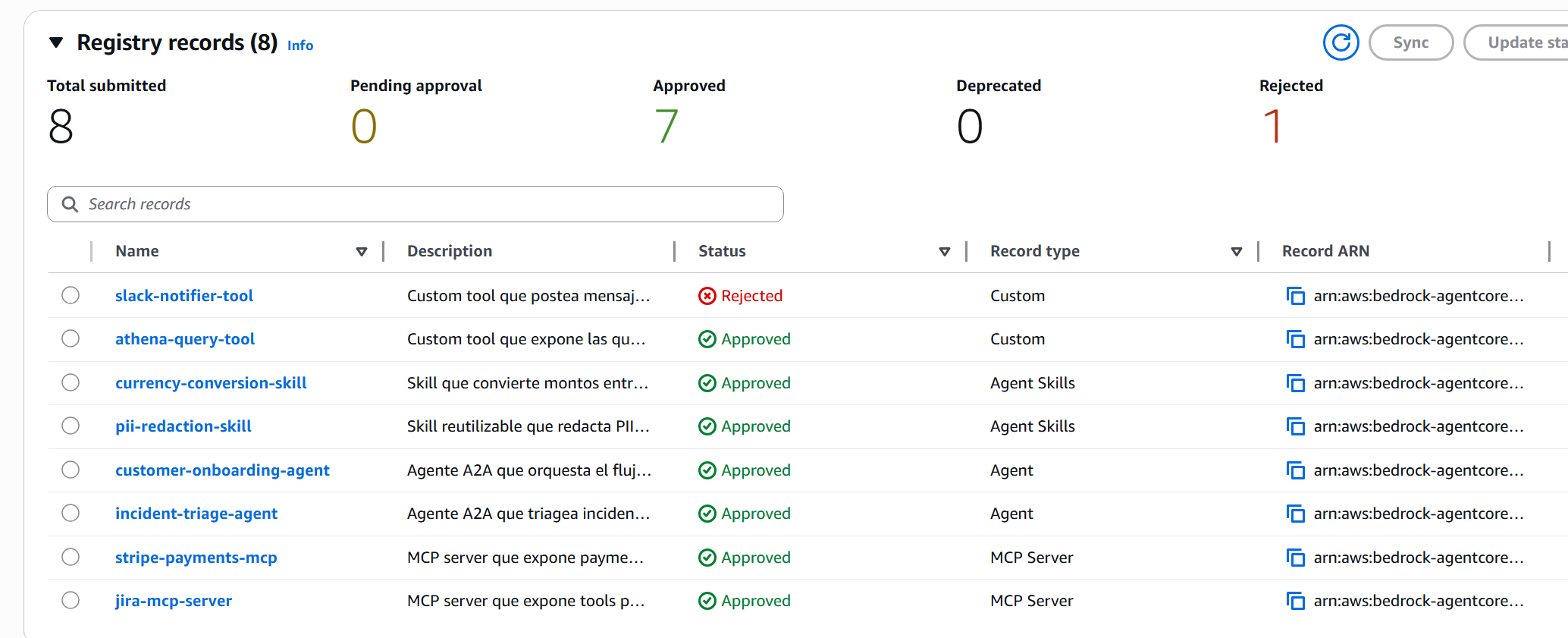
The console counters — Total submitted 8, Approved 7, Rejected 1 — confirm the flow. And the slack-notifier-tool shows up as Rejected in the table with its reason visible on click.
Worth highlighting what happens in the negative: the Publisher role can’t run update_registry_record_status. The demo proves it explicitly — I tried to approve as Publisher and got AccessDeniedException. When you cross the persona line, the Registry cuts you off. That’s exactly the model you want in production.
Hybrid search: the reality behind the “semantic” promise
Here we enter the section where marketing and execution diverge, and where your honest read of the product is worth more than the launch announcement. The Registry docs promise hybrid search: keyword and semantic running in parallel, with rank fusion, over the name, description, and descriptors fields (including tool names, descriptions, input schemas, and capabilities).
To understand what search actually does in practice, I ran 22 different queries against the 8 approved records; below I show the 15 most revealing ones grouped by pattern. The conclusion is nuanced and worth documenting.
Short queries (1–3 words) → de facto pure keyword
| Query | Matches | Comment |
|---|---|---|
stripe |
stripe-payments-mcp |
✅ keyword in name |
payments |
stripe-payments-mcp |
✅ keyword in description |
payment (singular) |
— | ❌ no stemming |
payment intent |
— | ❌ word order matters |
payment processing |
— | ❌ |
cobrar (verb) |
— | ❌ the description says “cobro” (noun), not “cobrar” |
issue refund |
jira-mcp-server |
🤔 “issue” is too strong in jira |
For short queries, the semantic part adds little. Stemming, synonym expansion, CamelCase splitting — things you expect from any modern search engine — don’t work. The Registry treats you like grep.
Long natural queries (5+ words) → that’s where the magic shows up
| Query | Top hit | Comment |
|---|---|---|
find me an agent that helps with new customer onboarding for retail clients |
customer-onboarding-agent |
✅ |
I want to redact PII from text before sending to an LLM |
pii-redaction-skill |
✅ |
tool to convert from MXN to USD |
currency-conversion-skill |
✅ |
agent for production incident triage and runbook suggestion |
incident-triage-agent |
✅ |
necesito procesar un pago en pesos mexicanos |
stripe-payments-mcp |
✅ multilingual |
redactar información personal antes de pasarla a un LLM |
pii-redaction-skill |
✅ |
Here it works: long natural-language queries — including ones written in Spanish against records mostly described in English — rank the right record. Multilingual semantic search works and is the product’s real differentiator.
But ranking gets dirty with strong keywords
| Query | Top hit returned | Top hit expected |
|---|---|---|
I need to charge a customer in Mexican pesos |
jira-mcp-server |
stripe-payments-mcp |
how can I issue a refund to a customer |
jira-mcp-server |
stripe-payments-mcp |
Jira shows up first on payment queries because the words issue and customer are very frequent in its tool descriptions, and the keyword component of scoring weights them too heavily. The semantic part adds points to Stripe but it isn’t enough to beat the keyword in Jira.
🔍 ProTip #6: The Registry’s “semantic search” is real but conditional. It truly kicks in only with long natural-language queries (5+ words) and gets dirty when two records share generic words (
customer,issue,agent,tool). That defines how you describe your records: write specific descriptions and avoid generic vocabulary that will compete against other records in the organization. And for public demos, deliberately pick long queries — the short ones produce results that will make you doubt the product.
There’s an extra detail about eventual consistency: during the lab I watched the query compliance go from 1 to 2 matches between the first 3 minutes and 15 minutes after approval. Search indexing isn’t instant. If your demo searches immediately after approving, consider waiting a couple of minutes before recording.
The console has its own search interface and shows the 7 approved records with visual cards:
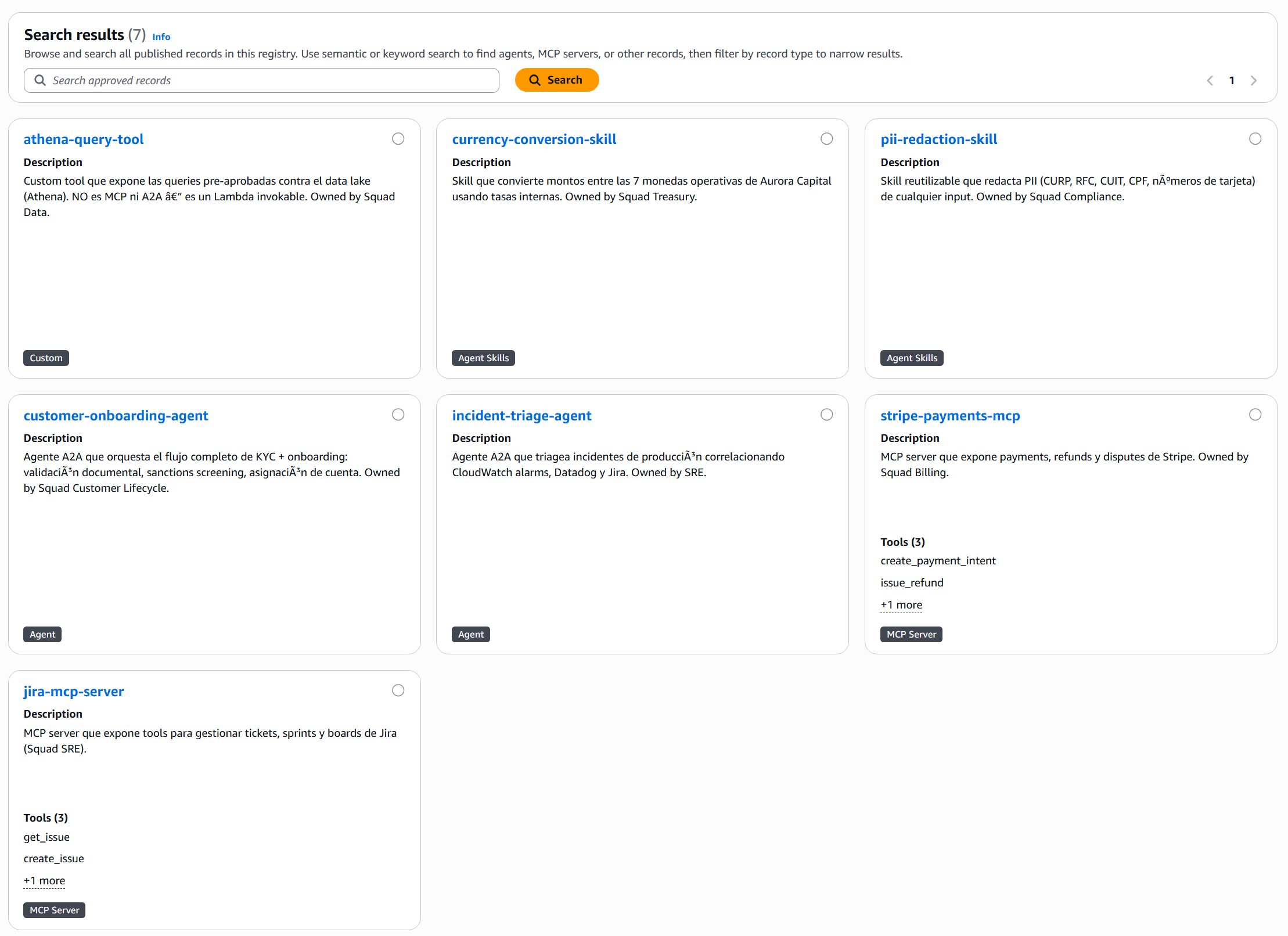
Note that the rejected slack-notifier-tool doesn’t appear — it’s invisible to search, exactly as the governance model promises.
The closing: Claude Code discovers your organization
So far we have a built catalog, governance enforced by the API, and working search. The question that matters is missing: how does a developer consume this in their day-to-day? The answer is what makes the Registry compelling: any MCP-compatible client — including Claude Code — can connect to the Registry and discover agents, tools, and skills without the developer ever opening the AWS console.
There are three steps: (1) build the MCP endpoint URL, (2) sign the requests with SigV4 because the Registry uses AWS_IAM, (3) configure the MCP client so it knows how to talk to that.
The endpoint URL, which the docs don’t surface obviously
get_registry() doesn’t return an mcpEndpoint field. The response carries name, status, registryArn, and little else. The endpoint path follows a path-based convention:
https://bedrock-agentcore.<region>.amazonaws.com/registry/<registryId>/mcp
Singular registry, not plural. You have to build it by hand from the registryId. Verifiable from Python with requests + botocore.auth.SigV4Auth:
from botocore.auth import SigV4Auth
from botocore.awsrequest import AWSRequest
import boto3, requests, json

creds = boto3.Session().get_credentials().get_frozen_credentials()
endpoint = f"https://bedrock-agentcore.us-east-1.amazonaws.com/registry/{registry_id}/mcp"

payload = {"jsonrpc": "2.0", "id": 1, "method": "tools/list", "params": {}}
req = AWSRequest(method="POST", url=endpoint,
                 data=json.dumps(payload),
                 headers={"Content-Type": "application/json"})
SigV4Auth(creds, "bedrock-agentcore", "us-east-1").add_auth(req)
resp = requests.post(endpoint, data=req.body, headers=dict(req.headers))
This works from Python. But Claude Code doesn’t natively support SigV4 over HTTP transport — it expects stdio or plain HTTP without AWS signing. You need a proxy in the middle.
The missing bridge: mcp-proxy-for-aws
AWS released an official proxy for this exact case: mcp-proxy-for-aws. It runs via uvx, spins up a local MCP server on stdio, and signs every request to the AWS endpoint with SigV4. That makes it invisible to the MCP client — Claude Code connects as if it were any stdio MCP server.
Configuration goes in .mcp.json at the project root (project scope):
{
  "mcpServers": {
    "aurora-capital-registry": {
      "type": "stdio",
      "command": "uvx",
      "args": [
        "mcp-proxy-for-aws@latest",
        "https://bedrock-agentcore.us-east-1.amazonaws.com/registry/<registryId>/mcp",
        "--service", "bedrock-agentcore",
        "--region",  "us-east-1"
      ]
    }
  }
}
It picks up credentials from the standard AWS environment — a profile that assumes the lab’s Consumer role. If you want to harden the client against any accidental write, add --read-only to the proxy args: it disables tools requiring write permissions, which fits the Consumer persona perfectly (discover, consume, don’t mutate). Restart Claude Code and the aurora-capital-registry MCP server appears available with a single tool: search_registry_records.
🚀 ProTip #7:
mcp-proxy-for-awsis the piece that closes the loop between AgentCore and IDEs/agents that speak MCP. Without it, connecting Claude Code to any AgentCore endpoint that uses AWS_IAM is manual and fragile. With it, any standard MCP client can connect transparently. Worth knowing about even if you don’t use it today — any future integration between AgentCore and external tools will likely go through this proxy.
The moment that makes the trip worth it
With the connection live, I tossed Claude Code in the IDE:
“Find me an agent that helps with new customer onboarding for retail clients.”
Without naming customer-onboarding-agent, without knowing which Squad built it, without opening Confluence. Claude queried the Registry over MCP and answered:
Found exactly what you need.
customer-onboarding-agentv1.2.0 (Aurora Capital, Squad Customer Lifecycle).
- Endpoint:
https://agents.aurora-capital.internal/onboarding- Capabilities: streaming + push notifications, input modes text + image (accepts a photo of the document)
- Supports: MX, CO, AR, BR, CL, PE
Three available skills:
kyc_document_validation— Validates national ID/INE/DNI per country, detects forgery via OCRsanctions_screening— Crosses name + date of birth against OFAC, UN, and local listsaccount_provisioning— Creates the account in core banking, assigns an initial productThis is exactly the retail flow you asked for. If you want to try it, send a POST to the A2A endpoint with a payload that invokes
kyc_document_validation.
A single pass. The developer received: the endpoint, the capabilities, the input modes, the available skills, and a recommendation on how to start. The Registry returned the full A2A descriptor embedded with the entire AgentCard, and Claude translated it into an actionable answer.
That’s what I’m calling the Registry’s “last mile”: it isn’t just that the catalog exists — it’s that the catalog is queryable in the context where the developer is already working, in natural language, without overhead.
This is the picture you take away from the product when it works well:
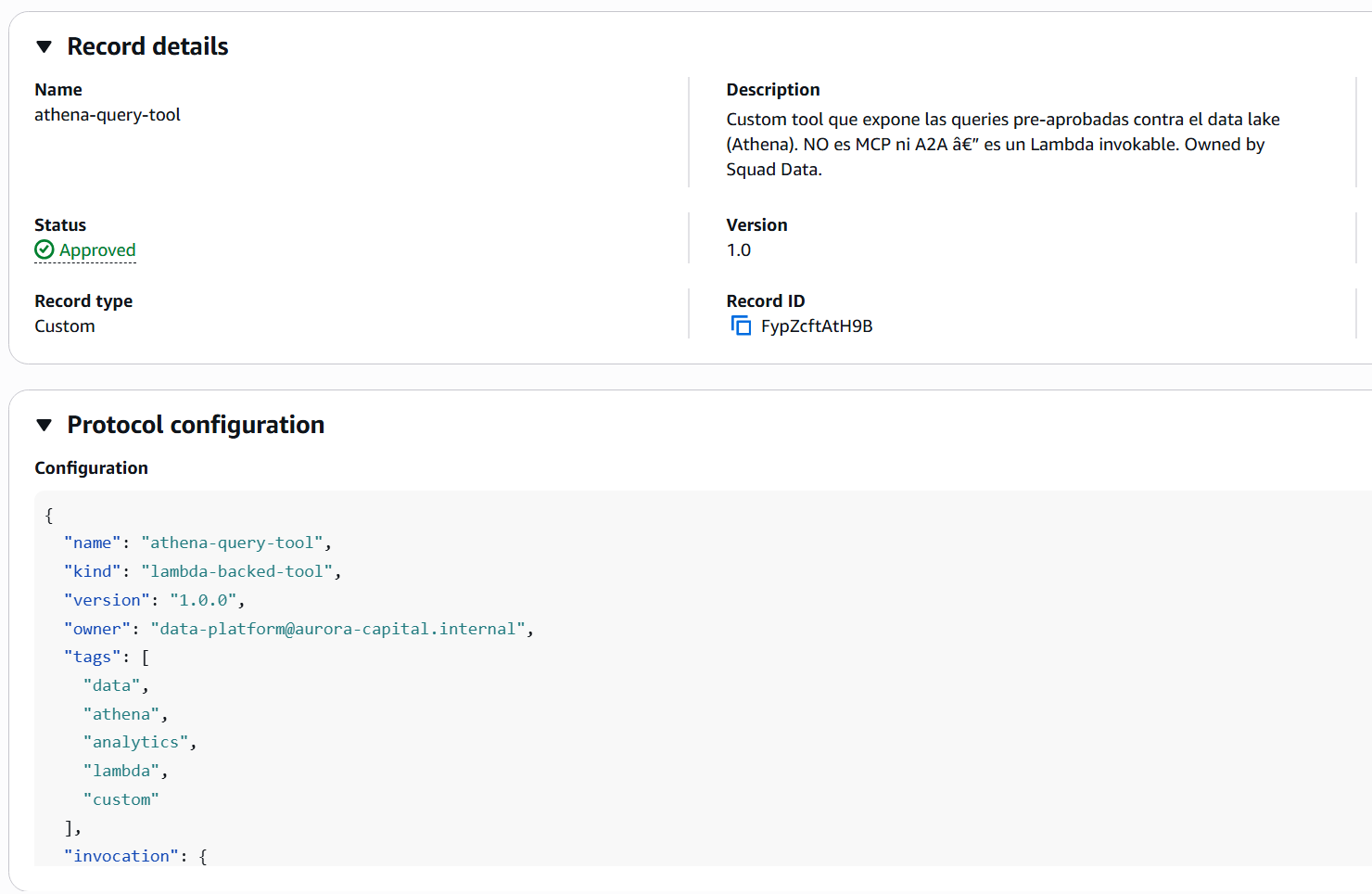
Each record comes with everything a consumer needs — not just name and description, but the full descriptor with schemas, endpoints, and package info. A single round trip, the entire contract for the resource.
Lessons learned
After the lab week, what I’m taking away about the product and how to recommend it to clients:
The 4-personas model is the strongest architectural decision in the service. It isn’t marketing — the separation holds in IAM, the demo’s AccessDenied errors are real, and the discipline it imposes (Publisher doesn’t approve their own work, Curator doesn’t write content) maps exactly to what you want in corporate governance. If your organization already has equivalent roles for other AWS resources, mapping them to the Registry is straightforward.
Descriptors weren’t ready for production in preview. Three of four types require hand iteration to discover the right shape. It’s worth writing a wrapper layer that normalizes — you’ll publish the same types many times and you don’t want to maintain four different patterns in your codebase. The GA announcement doesn’t mention changes to descriptor shapes, but don’t take that as confirmation — validate against the current API reference before assuming the four shapes below are still intact.
Semantic search has a narrow sweet spot. It works perfectly when the consumer makes long natural-language queries (which fits well with conversational agents) and breaks when you throw loose keywords at it (which disqualifies a big chunk of direct human use). That restriction is fine if the primary use case is Claude Code, Kiro, or other agents querying the Registry. It’s problematic if you imagine developers running grep from the console.
The gap between API and production reality was in EventBridge and the SDK. EventBridge has the event (Registry Record State Change) and the integration works, but the documentation of the exact payload shape lagged behind the implementation. The boto3 SDK had the methods but the AWS CLI was still catching up. The Terraform Provider didn’t have the resources. These three gaps were typical of a preview service.
🔄 Update (September 2026): The IaC gap closed with GA — CloudFormation, Terraform, and CDK now have official support. I didn’t verify whether the EventBridge payload documentation or the boto3/CLI pace are still lagging; if you depend on that, validate against current docs before assuming it resolved just as cleanly.
Cost zero during preview was the optimal point to adopt it early. With GA (August 31, 2026) there’s now real pricing per Net Records + API calls, with a monthly Free Tier (see the cost section above). If you haven’t migrated your inventory yet, it’s worth checking how much of your current volume falls within the Free Tier before the spend becomes a line item someone has to justify.
What isn’t here yet
So your mental map is complete, this didn’t exist in preview (April 2026) and is worth knowing what to expect — marked with 🔄 where GA already resolved it:
-
Auto-indexing of deployed runtimes. If you had an agent in AgentCore Runtime, it didn’t auto-publish to the Registry. You registered it manually.
🔄 Resolved in GA (August 2026): the Registry can now auto-detect agents on AgentCore Runtime and AgentCore Gateway across the entire organization and bring them into a central registry, with no manual authoring. See the GA announcement.
-
Federation between registries. Each account had its own registries; there was no native way to expose a Platform-account registry to the squads’ accounts.
🔄 Resolved in GA (August 2026): with AWS Resource Access Manager (RAM) you can now share registries across accounts and create org-wide registries. It isn’t full federation (it’s still “one shared registry,” not “multiple unified registries”), but it closes the Aurora Capital use case: the Platform account can share its registry with each squad’s account.
- Advanced versioning. The Registry supports
recordVersionbut doesn’t implement SemVer-aware diffing between versions. You mark 1.0, 1.1, 2.0 — the Registry doesn’t tell you if you break compatibility. (No confirmed change in GA — I found no mention of this in the announcement or docs; still as it was in preview, verify before assuming otherwise.) -
Full IaC support. Neither Terraform, nor CDK, nor the AWS CLI had the complete resources.
🔄 Resolved in GA (August 2026): official support for AWS CloudFormation, Terraform, and AWS CDK to provision and manage registries as code, plus tagging for organization, cost allocation, and access control.
- Metrics and ready dashboards. CloudWatch has the logs but there wasn’t a native dashboard of the “which records are most searched, which have the most rejections, etc.” kind. (No confirmed change in GA — the announcement doesn’t mention new dashboards; if this is a blocker for your adoption, verify current status before planning around it.)
GA (August 31, 2026) closed three of the five gaps above: auto-indexing, cross-account sharing, and IaC. SemVer-aware versioning and native dashboards aren’t mentioned in the GA announcement — if your adoption depends on either, don’t assume they were resolved and verify against the current documentation.
Conclusion
If you have more than three teams building agents in parallel in your organization, the moment to adopt Agent Registry is still now — the service reached GA on August 31, 2026, with a generous Free Tier (5,000 Net Records/month) and new IaC support, so the entry barrier went down instead of up. Anyone arriving at the Registry with 50 agents will have to write a migration program before extracting value; anyone arriving with 8 will integrate it in a sprint.
The product has rough edges, yes. Four descriptors with inconsistent shapes and a semantic search with a narrow sweet spot — GA didn’t change that. But the Terraform provider is here now, and the SDK no longer runs so far ahead of the CLI. The conceptual model — the 4 personas, the approval flow enforced by the API, the MCP endpoint consumable from any client — is solid and feels like a platform service, not an experiment.
And the closing with Claude Code is the moment where the return becomes obvious. When a developer can ask in natural language “is there an agent that does X?” and receive the full contract for the resource in a single pass, without opening Confluence or asking in Slack, that’s where the governance investment pays for itself.
🎓 ProTip #8: The catalog prevents duplication, but only if Publishers are disciplined when describing their resources. Write specific descriptions, use vocabulary your ideal Consumer would type as a query, avoid generic words (
tool,agent,service) without context. The Registry’s search is only as good as the worst descriptor you have indexed. That discipline is enforced by Curators at approval time — use rejection with a concrete reason to teach your Publishers how to write good descriptions.
The full lab repository is at github.com/codecr/bedrock-agent-registry — Terraform for the 4 IAM roles and EventBridge, Python for registry and records, the 8 Aurora Capital records with the corrected shapes, and the Claude Code .mcp.json ready to use. If you want to reproduce the lab in your account, you need boto3 ≥ 1.42.87 and BedrockAgentCoreFullAccess on the role that runs the first create_registry.
If you’re hungry for more on the Bedrock + GenAI stack, I’ll leave you my previous post — the real benchmark of 5 chunking strategies in Bedrock Knowledge Bases — where I apply the same “hands-on with all the honest subtleties” pattern but on the RAG side.
And if you’re on the side where this resonates — where you have several teams building agents in parallel and you don’t want to wait until you have 50 to start putting things in order — I’d love to hear your case. What does your agent inventory look like today? Who would take the Curator role in your organization? Is there a squad that’s already duplicating capabilities without realizing it?
Comment below or reach out on LinkedIn.
See you in the next article! 🚀
Frequently asked questions
What is AWS Agent Registry and what is it for?
AWS Agent Registry is a private Bedrock AgentCore catalog where an organization publishes MCP servers, A2A agents, skills, and custom resources with a pluggable approval workflow. It’s used to prevent agent sprawl, apply centralized governance (four IAM personas: Administrator, Publisher, Curator, and Consumer), and let any MCP-compatible client —including Claude Code— discover approved resources without opening the AWS console.
What is the cost of AWS Agent Registry now that it's GA?
AWS Agent Registry reached general availability (GA) on August 31, 2026. Registry usage was free during preview; with GA there’s consumption-based pricing with a Free Tier: the first 5,000 Net Records per month, the first 1,000,000 Search API calls, and the first 2,000,000 combined Get+List calls are free each month, verified against the official AgentCore pricing page. Above those thresholds you’re charged for Net Records (records alive at any moment; deleting one decrements the count) and for discovery API calls. A typical lab like this one stays comfortably within the Free Tier. You still pay the normal cost of auxiliary services (EventBridge, SNS, IAM, KMS, Secrets Manager).
Which boto3 and AWS CLI versions do I need for AWS Agent Registry?
boto3 ≥ 1.42.87 includes the bedrock-agentcore-control and bedrock-agentcore services from the start. AWS CLI v2 added them in version 2.34.28: if running ‘aws bedrock-agentcore-control list-registries’ returns ‘Found invalid choice’, check with ‘aws –version’ and update to 2.34.28 or later. During preview, the fastest way to iterate is still the Python SDK.
What types of records can I publish in AWS Agent Registry?
Four types: MCP (Model Context Protocol servers, validated against the official schema), A2A (corporate agents validated against the A2A AgentCard), AGENT_SKILLS (reusable capabilities packaged as Python or other languages, with JSON metadata and markdown docs), and CUSTOM (any JSON defined by the organization; useful for Lambda tools, internal HTTPS endpoints, or resources that don’t fit the other three). Each type has a descriptor with a different shape: only MCP works on the first try; the other three require iteration.
How do I connect Claude Code to AWS Agent Registry?
The Registry exposes an MCP endpoint with AWS_IAM authentication (SigV4) at https://bedrock-agentcore.
What are the 4 personas in the Registry's IAM model?
Administrator (infrastructure owner: creates registries, defines authentication, hooks up EventBridge), Publisher (the builder inside squads: creates and edits records in DRAFT and submits them for approval), Curator (approver: approves or rejects with a mandatory reason, deprecates live records), and Consumer (anyone searching for resources: only sees APPROVED and consumes the data plane). Each persona maps to a separate IAM policy; crossing the line produces real AccessDeniedException.
Which AWS regions is Agent Registry available in?
The same five as in preview: us-east-1 (N. Virginia), us-west-2 (Oregon), ap-southeast-2 (Sydney), ap-northeast-1 (Tokyo), and eu-west-1 (Ireland) — GA (August 31, 2026) didn’t expand regional coverage, verified against the official regions table. For Latin America, the closest option remains us-east-1; sa-east-1 (São Paulo) is still not enabled.




Start the conversation