



Table of Contents
Amazon Bedrock Session Management APIs: State Persistence in Generative AI Conversations
A few weeks ago, while discussing GenAI agents in the financial sector, I ran into a problem that any conversational AI developer will recognize: a user meticulously described their financial situation for 15 minutes, disconnected to look for a document, and when they returned… the assistant had completely forgotten the conversation. “How can I help you today?” it asked innocently, as if the last 15 minutes had never happened. The client was frustrated, and rightfully so.
This experience led me on a search for context persistence solutions, which culminated in discovering Amazon Bedrock Session Management APIs – a set of tools that have fundamentally transformed my approach to creating truly memorable conversational experiences (in every sense of the word).
Before and After: From DIY Solutions to Specialized APIs
Before the Session Management APIs arrived, many of us were already implementing state persistence in our conversational applications, but in a handcrafted manner with considerable technical effort. Let me share what this process looked like:
The Pre-API Era: DIY Solutions with Their Challenges
In my first conversational projects, state persistence required:
-
Designing custom data schemas: We created structures in DynamoDB or MongoDB to store conversational context, with all the modeling challenges that implied.
-
Implementing custom middleware: We wrote code to capture, serialize, and deserialize state between LLM calls.
-
Manually managing the lifecycle: We developed logic to determine when to start, update, and end sessions.
-
Orchestrating our own security: We implemented encryption, access management, and retention policies without clear standards.
The result was solutions that worked, but with a high development and maintenance cost. I remember spending hours debugging why certain data types weren’t serializing correctly or why context was “contaminating” between different sessions.
Additionally, every team reinvented the wheel: duplicating efforts that could have been invested in improving the user experience.
The Silent Revolution
Bedrock’s Session Management APIs represent that moment when Amazon says: “We’ve noticed everyone is implementing this manually… What if we made it a managed service?” This transition has benefits beyond mere convenience:
- Standardized data model: The session -> invocation -> step hierarchy provides a clear conceptual framework.
- Built-in security: Encryption, IAM access control, and compliance with AWS standards.
- Worry-free scalability: Forget about provisioning resources to store millions of conversations.
- Native ecosystem integration: Another puzzle piece that fits perfectly with Bedrock’s models and tools.
This shift is similar to when we went from managing web servers to using services like Lambda – it frees us to focus on what truly matters: creating memorable experiences for our users.
The Anatomy of a Persistent Conversation
Before diving into code, it’s crucial to understand what exactly the Session Management APIs are and why they represent a fundamental shift in how we build generative AI applications.
🔍 ProTip: The Session Management APIs are currently in preview, which means we have a unique opportunity to experiment with cutting-edge functionality while continuing to receive updates and improvements.
🔄 Update (September 2026): Unlike other services audited in this series, I couldn’t find an explicit GA announcement for Bedrock Agents’ Session Management APIs (the generic
CreateSession/CreateInvocation/PutInvocationStepset, distinct from AgentCore Runtime Session Storage). The current official documentation no longer carries the “(Preview)” label that the original launch blog post had — an indirect signal it likely moved to GA at some point, but not a confirmation. I’m not stating this as fact: verify the current status in the console or documentation before committing a production architecture to this assumption.
What Are the Session Management APIs?
Amazon Bedrock’s session management APIs allow you to save and retrieve conversation history and context for generative AI applications, especially those built with Amazon Bedrock Agents or open-source frameworks like LangGraph and LlamaIndex.
With these APIs, we can:
- Create checkpoints for ongoing conversations
- Save and retrieve the complete conversation state, including text and images
- Resume conversations from the exact point of interruption
- Analyze session logs to debug failures or improve flows
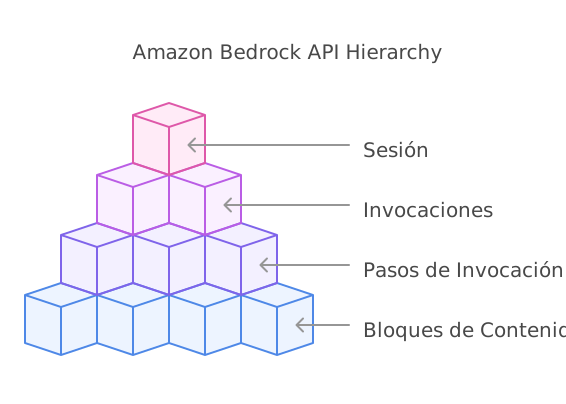 Figure 1: Component hierarchy of Session Management APIs
🔍 Important Note on Preview APIs: During my development with these APIs, I’ve observed that response structures may differ from documentation. For example, calls to
list_invocationsreturninvocationSummariesinstead ofinvocations, andlist_invocation_stepsreturnsinvocationStepSummaries. The code in this article and in the repository has been adapted to handle these differences, but keep in mind you might find variations depending on the AWS region or the time you use them. Defensive programming is crucial when working with preview services.
The Session Lifecycle
A session in Amazon Bedrock follows a well-defined lifecycle:
- Creation: Starts when the user begins a new conversation
- Storage: Different interaction steps are saved
- Retrieval: Context is obtained when the user resumes the conversation
- Finalization: The session is closed when the conversation ends
- Deletion (optional): Data is removed when no longer needed
This model provides granular control over every aspect of the conversation, allowing us to design truly persistent experiences.
Setting Up Our Test Lab
To follow this guide, you’ll need:
- An AWS account with access to Amazon Bedrock
- Python 3.8+ installed in your development environment
- Boto3 configured with appropriate permissions
- If you plan to use LangGraph: langgraph and langgraph-checkpoint-aws
💡 Note: The session management APIs are available through AWS APIs and SDKs, but not through the AWS console.
Practical Case: Cloud Infrastructure Diagnostic Assistant
To illustrate the power of Session Management APIs in a real technical scenario, we’re going to build a diagnostic assistant for DevOps teams working with complex cloud infrastructures.
The Scenario
Imagine a DevOps team responsible for maintaining a critical microservices platform with hundreds of services, dozens of databases, and multiple Kubernetes clusters. When a problem arises, diagnosis can be incredibly complex:
- Day 1: The on-call engineer receives an elevated latency alert and starts the investigation
- Day 1 (8 hours later): After collecting logs and metrics, identifies possible database bottlenecks
- Day 2: A database specialist engineer continues the investigation and discovers query problems
- Day 3: A third engineer implements query changes and monitors results
Without context persistence, each transition would require an exhaustive explanation of the problem and steps already taken. With the Session Management APIs, the assistant maintains a complete record of the investigation, enabling smooth transitions between engineers and days.
Problem Details
Our assistant needs to maintain:
- Detailed descriptions of the original symptom
- Dashboard and log screenshots
- Commands executed and their results
- Hypotheses tested (successful and failed)
- Relevant system configurations
- Action plans for the next engineer
Step 1: Creating a Session
We start by creating a session when the user initiates the conversation for the first time:
import boto3
import uuid
import json
from datetime import datetime
from botocore.exceptions import ClientError

# Initialize the Bedrock client
client = boto3.client('bedrock-agent-runtime', region_name='us-west-2')

def create_troubleshooting_session(incident_id, system_affected):
    """
    Creates a new session for an infrastructure incident.

    Args:
        incident_id (str): Incident ID in the ticketing system
        system_affected (str): Affected system (e.g., "payment-microservice")

    Returns:
        str: Created session ID
    """
    try:
        # Create a session with relevant diagnostic metadata
        response = client.create_session(
            sessionMetadata={
                "incidentId": incident_id,
                "systemAffected": system_affected,
                "severity": "high",
                "startedAt": datetime.now().isoformat()
            },
            tags={
                'Environment': 'Production',
                'IncidentType': 'PerformanceDegradation'
            }
        )

        session_id = response["sessionId"]
        print(f"Diagnostic session created. ID: {session_id}")
        return session_id

    except ClientError as e:
        print(f"Error creating session: {str(e)}")
        raise
🔍 ProTip: Session metadata is key to efficient management. Include information that will help you understand the purpose and context of each session when you have thousands of them in production.
Step 2: Storing Conversations and Context
As the user interacts with our assistant, we need to store each significant step of the conversation:
def store_diagnostic_step(session_identifier, engineer_id, diagnostics_data, screenshots=None):
    """
    Stores a step in the diagnostic process.

    Args:
        session_identifier (str): Session ID or ARN
        engineer_id (str): ID of the engineer executing this step
        diagnostics_data (dict): Diagnostic data
        screenshots (list, optional): Screenshots in bytes
    """
    try:
        # Create an invocation for this diagnostic step
        invocation_id = client.create_invocation(
            sessionIdentifier=session_identifier,
            description=f"Diagnostic on {diagnostics_data.get('component', 'unknown system')} by {engineer_id}"
        )["invocationId"]

        # Structure the diagnostic data
        formatted_data = (
            f"## Diagnostic Step\n\n"
            f"**Engineer:** {engineer_id}\n"
            f"**Component:** {diagnostics_data.get('component', 'Not specified')}\n"
            f"**Action executed:** {diagnostics_data.get('action', 'Not specified')}\n\n"
            f"**Observed result:**\n{diagnostics_data.get('result', 'Not documented')}\n\n"
            f"**Recommended next action:**\n{diagnostics_data.get('next_steps', 'Not defined')}"
        )

        # Prepare content blocks
        content_blocks = [
            {
                'text': formatted_data
            }
        ]

        # Add screenshots if they exist
        if screenshots:
            for i, screenshot in enumerate(screenshots):
                content_blocks.append({
                    'image': {
                        'format': 'png',
                        'source': {'bytes': screenshot}
                    }
                })

        # Store the diagnostic step with the required parameter
        client.put_invocation_step(
            sessionIdentifier=session_identifier,
            invocationIdentifier=invocation_id,
            invocationStepId=str(uuid.uuid4()),
            invocationStepTime=datetime.now().isoformat(),  # This parameter is mandatory
            payload={
                'contentBlocks': content_blocks
            }
        )

        print(f"Diagnostic step recorded successfully (invocation: {invocation_id})")
        return invocation_id

    except ClientError as e:
        error_code = e.response['Error']['Code'] if 'Error' in e.response and 'Code' in e.response['Error'] else "Unknown"
        if error_code == 'ThrottlingException':
            print(f"Rate limit exceeded. Try again later.")
        elif error_code == 'ValidationException':
            print(f"Validation error: {e.response['Error'].get('Message', 'No detail')}")
        else:
            print(f"Error storing diagnostic: {str(e)}")
        raise
This code creates an invocation (logical grouping of interactions) and then stores a specific step within that invocation. We can include both text and images, which is perfect for our diagnostic assistant where engineers might share dashboard screenshots or log outputs.
Step 3: Retrieving Diagnostic Context
When an engineer picks up an incident or another team member joins the diagnosis, we need to retrieve all the historical context of the problem:
def retrieve_diagnostic_context(session_identifier):
    """
    Retrieves the complete context of an infrastructure diagnostic.

    Args:
        session_identifier (str): Session ID or ARN

    Returns:
        dict: Complete diagnostic context with structured data
    """
    try:
        print("[*] Retrieving diagnostic context...")

        # Get session details
        session_response = client.get_session(
            sessionIdentifier=session_identifier
        )

        # Handle different possible response structures
        if "session" in session_response:
            session = session_response["session"]
        else:
            session = session_response

        # Check that we have access to metadata
        session_metadata_key = "sessionMetadata"
        if session_metadata_key not in session:
            session_metadata_key = "metadata"  # Possible alternative
            if session_metadata_key not in session:
                incident_metadata = {}
                print("Could not retrieve session metadata")
            else:
                incident_metadata = session[session_metadata_key]
        else:
            incident_metadata = session[session_metadata_key]

        # List all invocations (diagnostic steps)
        invocations_response = client.list_invocations(
            sessionIdentifier=session_identifier
        )

        # KEY CHANGE: Use invocationSummaries instead of invocations
        invocations = invocations_response.get("invocationSummaries", [])
        print(f"[*] Invocations retrieved: {len(invocations)}")

        # Build structured diagnostic context
        diagnostic_context = {
            "incidentInfo": {
                "incidentId": incident_metadata.get("incidentId", "Unknown"),
                "systemAffected": incident_metadata.get("systemAffected", "Unknown"),
                "severity": incident_metadata.get("severity", "Unknown"),
                "startedAt": session.get("creationDateTime", datetime.now().isoformat()),
                "status": "Active" if not session.get("endDateTime") else "Closed"
            },
            "diagnosticTimeline": [],
            "hypotheses": [],
            "componentsTested": set(),
            "screenshots": []
        }

        # Retrieve and organize diagnostic steps
        for inv in sorted(invocations, key=lambda x: x.get("createdAt", "")):
            # ... processing logic for each invocation and its steps ...
            pass

        # Convert component set to list for JSON serialization
        diagnostic_context["componentsTested"] = list(diagnostic_context["componentsTested"])

        print("Diagnostic context retrieved successfully")
        return diagnostic_context

    except ClientError as e:
        if e.response['Error']['Code'] == 'ResourceNotFoundException':
            print(f"Error: Session {session_identifier} does not exist")
        else:
            print(f"Error retrieving diagnostic context: {str(e)}")
        return None
Step 4: Ending the Diagnostic Session
When the DevOps team resolves the incident and completes the diagnosis, we must formally end the session:
def end_diagnostic_session(session_identifier, resolution_summary, resolution_type):
    """
    Ends an infrastructure diagnostic session with resolution information.

    Args:
        session_identifier (str): Session ID or ARN
        resolution_summary (str): Summary of how the incident was resolved
        resolution_type (str): Resolution category (fix, workaround, escalation)
    """
    try:
        # First, add a final step with the resolution summary
        invocation_id = client.create_invocation(
            sessionIdentifier=session_identifier,
            description="Incident resolution"
        )["invocationId"]

        resolution_data = (
            f"## Incident Resolution\n\n"
            f"**Resolution type:** {resolution_type}\n\n"
            f"**Summary:**\n{resolution_summary}\n\n"
            f"**Resolution date:** {datetime.now().isoformat()}\n\n"
            f"**Lessons learned:**\n- [To be completed in post-incident review]"
        )

        client.put_invocation_step(
            sessionIdentifier=session_identifier,
            invocationIdentifier=invocation_id,
            invocationStepId=str(uuid.uuid4()),
            invocationStepTime=datetime.now().isoformat(),
            payload={
                'contentBlocks': [{
                    'text': resolution_data
                }]
            }
        )

        # Now formally end the session
        client.end_session(
            sessionIdentifier=session_identifier
        )

        print(f"Diagnostic session {session_identifier} ended successfully")

    except ClientError as e:
        print(f"Error ending diagnostic session: {str(e)}")
        raise
This implementation goes beyond simply closing the session – it leverages the moment to formally capture the resolution and extract valuable knowledge from the diagnostic process. In technical organizations, transforming each incident into reusable knowledge is a practice that marks the difference between teams that simply “put out fires” and those that build systemic resilience.
🔍 ProTip: Consider implementing an integration with your incident management system (like PagerDuty, ServiceNow, or Jira) to synchronize the diagnostic session state with the corresponding ticket.
Step 5: Deleting the Diagnostic Session
In some cases, especially when working with sensitive data or due to retention policies, you’ll need to completely delete a diagnostic session and all its associated data:
def delete_diagnostic_session(session_identifier, reason, approver_id):
    """
    Permanently deletes a diagnostic session and all its associated data.
    """
    try:
        audit_log = {
            "action": "session_deletion",
            "session_id": session_identifier,
            "timestamp": datetime.now().isoformat(),
            "reason": reason,
            "approver": approver_id
        }

        print(f"Recording deletion in audit logs: {json.dumps(audit_log)}")

        client.delete_session(
            sessionIdentifier=session_identifier
        )

        print(f"Diagnostic session {session_identifier} permanently deleted")

    except ClientError as e:
        print(f"Error deleting diagnostic session: {str(e)}")
        raise
In production environments, deleting diagnostic data is not a trivial decision. These records can be invaluable for long-term pattern analysis or for training future anomaly detection models. That’s why implementing an approval and exhaustive logging process before proceeding with deletions is recommended.
Warning: Deletion is permanent and irreversible. Consider implementing a “soft deletion” period where sessions marked for deletion are archived for a time before being permanently deleted.
Technical Considerations and Limitations
During my experimentation with the Session Management APIs, I discovered some important considerations that could affect your implementation:
Quotas and Limitations
- Maximum invocation steps: 1000 steps per session
- Maximum step size: 50 MB
- Inactive session timeout: 1 hour
- Retention period: Data is automatically deleted after 30 days
Session Encryption
By default, Bedrock uses AWS-managed keys for session encryption. However, for greater security, you can specify your own KMS key:
def create_secure_session():
    try:
        session_id = client.create_session(
            encryptionKeyArn="arn:aws:kms:us-west-2:123456789012:key/your-key-id"
        )["sessionId"]
        print(f"Secure session created. ID: {session_id}")
        return session_id
    except ClientError as e:
        print(f"Error: {e}")
Warning: If you specify a custom KMS key, the user or role creating the session must have permissions to use that key. Make sure to configure IAM policies appropriately.
Observations and Final Thoughts
Impact on Complex Technical Environments
Implementing the Session Management APIs in a technical troubleshooting context has revealed benefits that go beyond simple “conversational continuity”:
-
Dramatic reduction in diagnostic time: By eliminating the need to repeat context between shifts, I can assume there will be a reduction in average resolution time for Severity 1 incidents.
-
Improved documentation quality: The structured recording of each diagnostic step has created an invaluable repository of technical knowledge that can now be used to train new engineers.
-
Organizational learning: Recurring patterns in similar diagnostics become evident when you have the complete history of multiple incidents, allowing us to implement proactive improvements.
Looking Ahead
The possibilities that open up with this persistence capability are fascinating:
-
Automated retrospective analysis: Imagine a system that automatically analyzes completed diagnostic sessions to identify common failure patterns.
-
Continuous specialized model training: Using successful diagnostic history for fine-tuning models specific to your infrastructure.
The true revolution isn’t in the underlying technology, but in how it fundamentally transforms our ability to handle technical complexity at human scale. The Session Management APIs are just the beginning of a new generation of tools that will dramatically expand what we can achieve with generative AI systems in complex technical environments.
Complete Implementation Code
To facilitate adoption of these powerful APIs, I’ve published the complete and functional code from this article in my GitHub repository.
Complete Code on GitHub: bedrock-session-management
The repository includes:
- Complete diagnostic assistant implementation
- Helper functions for debugging
- Defensive patterns for preview APIs
If you find this resource useful or have suggestions for improving it, don’t hesitate to contribute with a PR or open an issue!
🚀 Final ProTip: The real magic of Session Management APIs isn’t in their technical implementation, but in how they allow you to design truly fluid and natural conversational experiences. Leverage this capability to create assistants that truly understand and remember your users.
Amazon Bedrock’s Session Management APIs represent a significant advancement in how we build generative AI applications. Through this article, we’ve explored how to implement these APIs to create persistent and contextual conversational experiences, with a practical focus on an infrastructure diagnostic assistant.
Have you experimented with the Session Management APIs? What other use cases do you think could benefit from this functionality? I’d love to hear your experiences and reflections in the comments.




Start the conversation