



Table of Contents
- The Inflection Point: When Specialized Tools Meet Generative AI 🔍
- What is Model Context Protocol? The Standard We’ve Been Waiting For
- MCP vs. Function Calling: Solving the m × n Scalability Problem
- The Power of Auto-Discovery: Tools That Reveal Themselves
- Practical Case: Digital Forensics Analysis Assistant
- Architecture of Our Solution
- Implementing the MCP Server: Specialized Forensic Tools
- Implementing the Bedrock Client: Conversational Intelligence
- Live Demo: Automated Forensic Analysis
- 🎯 Result of the Automated Forensic Analysis
- Production Considerations and Scalability
- Final Reflections: The Future of AI Integrations
Model Context Protocol and Amazon Bedrock: Building a Digital Forensics Analysis Assistant
The Inflection Point: When Specialized Tools Meet Generative AI 🔍
While exploring ways to connect language models with specialized tools, I came across a fascinating question: why does every AI developer keep reinventing the wheel when it comes to integrating LLMs with external APIs, databases, and domain-specific tools?
The traditional answer had been to implement custom “function calling” for each use case, creating ad-hoc solutions that worked for a specific project but were rarely reusable. It was like every house builder designing their own electrical system from scratch instead of using established standards.
That reflection led me to discover Model Context Protocol (MCP) — a specification that promises to do for AI integrations what HTTP did for web communications: establish a universal standard. Combined with Amazon Bedrock, it opens extraordinary possibilities for building specialized assistants that go far beyond simple conversations.
To explore these capabilities in a practical way, I decided to build something that would let me really test the protocol: a digital forensics analysis assistant capable of analyzing complex security incidents, correlating evidence, and automating investigations that normally take hours or days to complete.
🔄 Update (September 2026): This article (August 2025) integrates MCP by hand with FastMCP + LangGraph — a portable pattern that’s still valid and educational for understanding the protocol under the hood. Since then, Amazon Bedrock AgentCore (GA October 2025) added AgentCore Gateway, which connects natively to existing MCP servers and exposes APIs/Lambda functions as MCP-compatible tools, without you having to write the FastMCP server or the connection client yourself. If you’re evaluating a new architecture today, it’s worth comparing this article’s manual approach against Gateway — I cover the full AgentCore ecosystem in this blog’s dedicated series.
What is Model Context Protocol? The Standard We’ve Been Waiting For
Model Context Protocol (MCP) is an open specification developed by Anthropic that solves a fundamental problem in AI application development: how to standardize the connection between Large Language Models and external tools, data sources, and services.
The Problem MCP Solves
Before MCP, every developer implemented their own solution for connecting LLMs with external tools:
# Enfoque tradicional: función personalizada para cada herramienta
def analyze_security_logs(log_path):
    # Implementación específica y no reutilizable
    pass

def check_ip_reputation(ip):
    # Otra implementación específica
    pass

# El LLM debe conocer estas funciones específicas
available_tools = [analyze_security_logs, check_ip_reputation]
With MCP, these tools are exposed through a standardized protocol:
# Enfoque MCP: servidor estandarizado
@app.tool()
def analyze_log_file(file_path: str, analysis_type: str) -> str:
    """Analiza un archivo de logs para identificar actividad sospechosa."""
    # Implementación con interfaz estandarizada

@app.tool()
def check_ip_reputation(ip_address: str) -> str:
    """Verifica la reputación de una dirección IP."""
    # Implementación con interfaz estandarizada
MCP Architecture: Simplified Client-Server
MCP implements an elegant client-server architecture that cleanly separates responsibilities:
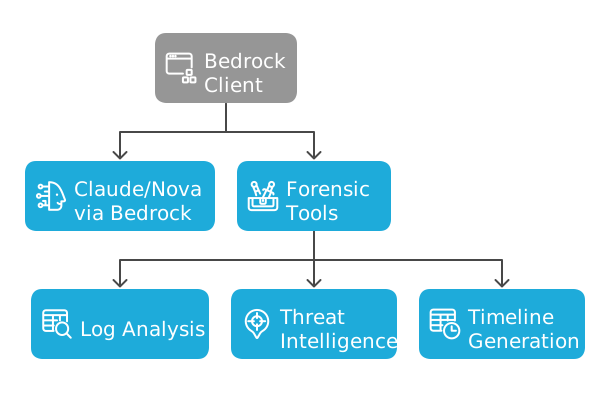 Figure 1: MCP Architecture
The Three Pillars of MCP
MCP organizes capabilities into three fundamental categories:
- Tools — Functions that models can execute
- Security log analysis
- IP reputation verification
- Forensic report generation
- Resources — Data that can be included in context
- Threat databases
- System configurations
- Knowledge repositories
- Prompts — Templates that guide interaction
- Forensic analysis templates
- Incident report structures
- Technical documentation formats
🔍 Key Insight: MCP is not just another API — it’s a communication protocol that allows any specialized tool to connect with any LLM without custom integration code.
MCP vs. Function Calling: Solving the m × n Scalability Problem
To understand MCP’s real value, it’s crucial to grasp the m × n scalability problem it solves.
The m × n Problem in Traditional Function Calling
Imagine you have:
- m applications (ChatGPT, Claude, your custom app)
- n specialized tools (log analysis, IP verification, databases)
With traditional function calling, each application requires its own custom integration with each tool:
# Aplicación 1: ChatGPT
def chatgpt_log_analyzer(logs):
    # Implementación específica para ChatGPT
    return analysis

def chatgpt_ip_checker(ip):
    # Implementación específica para ChatGPT
    return reputation

# Aplicación 2: Claude
def claude_log_analyzer(logs):
    # Implementación específica para Claude
    return analysis

def claude_ip_checker(ip):
    # Implementación específica para Claude
    return reputation

# Aplicación 3: Tu app personalizada
def custom_log_analyzer(logs):
    # Implementación específica para tu app
    return analysis
Result: You need m × n custom integrations.
With 3 applications and 5 tools = 15 unique integrations to maintain.
The MCP Solution: m + n instead of m × n
MCP fundamentally changes this equation:
# 1 servidor MCP para todas las herramientas (n)
app = FastMCP("Universal Tool Server")

@app.tool()
def analyze_log_file(file_path: str, analysis_type: str) -> str:
    """Una implementación que funciona con CUALQUIER cliente MCP."""
    return json.dumps(analysis_results)

@app.tool()
def check_ip_reputation(ip_address: str) -> str:
    """Una implementación que funciona con CUALQUIER cliente MCP."""
    return json.dumps(reputation_data)
Result: You only need m + n components.
With 3 applications and 5 tools = 8 components (3 MCP clients + 5 MCP servers).
Impact in Practice
Development: Instead of building 15 unique integrations, you build 8 reusable components.
Maintenance: Instead of maintaining 15 different codebases, you maintain 8 standard components.
Scalability: Adding a new application requires only 1 additional MCP client, not n new integrations.
Time to market: New tools are immediately available to all applications.
The Power of Auto-Discovery: Tools That Reveal Themselves
One of MCP’s most revolutionary capabilities is its dynamic auto-discovery of tools. Unlike traditional approaches where each integration must be manually coded, MCP allows clients to automatically discover what tools are available at runtime.
Dynamic Discovery in Action
Here’s how our Bedrock client automatically discovers the available forensic tools:
async def refresh_available_tools(self):
    """Descubre dinámicamente todas las herramientas del servidor MCP"""

    if not self.session:
        raise Exception("No MCP session established")

    try:
        # El cliente pregunta: "¿Qué herramientas tienes disponibles?"
        response = await asyncio.wait_for(
            self.session.list_tools(),
            timeout=5.0
        )

        self.available_tools = []
        for tool in response.tools:
            # Cada herramienta se autodescribe con metadatos ricos
            tool_spec = {
                'toolSpec': {
                    'name': tool.name,
                    'description': tool.description,
                    'inputSchema': {
                        'json': tool.inputSchema  # Schema JSON completo
                    }
                }
            }
            self.available_tools.append(tool_spec)

        # Logging automático de capacidades descubiertas
        print(f"🔧 Discovered {len(self.available_tools)} specialized tools:")
        for tool in self.available_tools:
            print(f"  • {tool['toolSpec']['name']}: {tool['toolSpec']['description']}")

    except Exception as e:
        print(f"❌ Failed to discover tools: {e}")
        raise
The Magic of Automatic Discovery
What’s extraordinary is that the client doesn’t need to know what tools will exist. When we connect our forensic server, it automatically discovers:
analyze_log_file— Intelligent security log analysischeck_ip_reputation— Verification against threat databasesextract_iocs— Extraction of indicators of compromisegenerate_timeline— Incident timeline generationgenerate_incident_report— Automatic executive reports
But if tomorrow we add a new scan_memory_dump tool to the server, the client will discover it automatically without modifying a single line of code.
🔍 Transformative Insight: According to research by SuperAGI, auto-discovery reduces initial development time by 30% and maintenance costs by 25% compared to custom integrations. A16z emphasizes that “MCP introduces a powerful capability for AI models to dynamically discover and use available tools, rather than being limited to a predefined set of functions.”
Practical Case: Digital Forensics Analysis Assistant
To demonstrate MCP + Bedrock capabilities, we’ll build a cybersecurity specialist assistant that can:
- Intelligently analyze security logs
- Verify reputation of IPs and domains
- Extract and correlate indicators of compromise (IOCs)
- Automatically generate incident timelines
- Create executive reports for stakeholders
The Reality of Manual Forensic Analysis
A typical forensic analyst must:
- Correlate multiple sources: Firewall logs, detection systems, Windows events, application records
- Identify subtle patterns: IOCs scattered across millions of entries
- Verify reputation: Check IPs, domains, and hashes against threat databases
- Generate timelines: Reconstruct the exact sequence of incident events
- Communicate findings: Create executive reports for non-technical stakeholders
An average incident can take hours or days of manual analysis. In the cybersecurity world, that’s an eternity.
🔍 Reality Check: According to IBM’s “Cost of a Data Breach Report 2024”, the average time to identify and contain a breach is 277 days. Each additional day costs approximately $4.9 million more in damages.
Architecture of Our Solution
Our Forensic Digital Assistant will combine MCP with Amazon Bedrock to create a specialized AI analyst:
🔬 Forensic MCP Server (Herramientas especializadas)
├── analyze_log_file() - Análisis inteligente de logs
├── check_ip_reputation() - Verificación de reputación de IPs
├── extract_iocs() - Extracción de indicadores de compromiso
├── generate_timeline() - Generación de timeline de incidentes
└── generate_incident_report() - Reportes ejecutivos automáticos

🤖 Bedrock MCP Client (Interfaz inteligente)
├── Claude 3.7 Sonnet/3.5 Haiku - Análisis y razonamiento
├── Amazon Nova Pro/Lite - Modelos propios de AWS
└── Conversational Interface - Interacción natural
Implementing the MCP Server: Specialized Forensic Tools
Let’s start with the heart of our system: an MCP server that exposes specialized tools for digital forensic analysis.
💡 Full Code: All code examples in this article, including complete server and client implementations, are available in my GitHub repository. The examples here focus on key concepts to keep the article flowing.
Base Server Configuration
The MCP server uses FastMCP to expose tools with a standardized interface:
#!/usr/bin/env python3
"""
Servidor MCP para Análisis Forense Digital
Expone herramientas especializadas mediante protocolo estandarizado
"""

import json
from datetime import datetime
from typing import Dict, Any

try:
    from mcp.server.fastmcp import FastMCP
    MCP_AVAILABLE = True
except ImportError:
    print("❌ Install MCP: pip install mcp")
    MCP_AVAILABLE = False

# Inicializar servidor con herramientas forenses
if MCP_AVAILABLE:
    app = FastMCP("Digital Forensics MCP Server")
Log Analysis Tool (Representative Example)
Here we see how a forensic tool is exposed through MCP with a self-describing interface:
@app.tool()
def analyze_log_file(file_path: str, analysis_type: str = "security") -> str:
    """
    Analiza un archivo de logs para identificar actividad sospechosa.

    Args:
        file_path: Ruta al archivo de log
        analysis_type: Tipo de análisis (security, network, authentication)

    Returns:
        JSON con análisis detallado del log
    """

    # NOTA: En un entorno real, esto leería archivos reales
    # Para la demo, usamos datos simulados que representan patrones típicos
    sample_security_events = [
        "2025-01-20 14:23:15 [WARNING] Authentication failure from 192.168.1.100",
        "2025-01-20 14:26:45 [CRITICAL] Suspicious PowerShell execution on WORKSTATION-01",
        "2025-01-20 14:27:10 [WARNING] Outbound connection to evil-domain.com",
        "2025-01-20 14:29:15 [CRITICAL] Process injection detected: PID 1234 → PID 5678"
    ]

    analysis_results = {
        "file_analyzed": file_path,
        "analysis_type": analysis_type,
        "timestamp": datetime.now().isoformat(),
        "findings": [],
        "risk_score": 0,
        "recommendations": []
    }

    # Detectar patrones de ataque usando lógica de análisis forense
    for log_entry in sample_security_events:
        if "Authentication failure" in log_entry:
            analysis_results["findings"].append({
                "type": "brute_force_attack",
                "severity": "HIGH",
                "description": "Multiple authentication failures detected",
                "indicators": ["credential_stuffing", "automated_attack"]
            })
            analysis_results["risk_score"] += 25

        elif "PowerShell execution" in log_entry:
            analysis_results["findings"].append({
                "type": "living_off_the_land",
                "severity": "CRITICAL",
                "description": "Suspicious PowerShell activity",
                "indicators": ["fileless_malware", "encoded_commands"]
            })
            analysis_results["risk_score"] += 40

    # Generar recomendaciones basadas en hallazgos
    if analysis_results["risk_score"] > 80:
        analysis_results["recommendations"].extend([
            "Immediate incident response required",
            "Isolate affected systems from network",
            "Deploy additional monitoring on critical assets"
        ])

    return json.dumps(analysis_results, indent=2)
Other Specialized Tools
The server includes additional tools for complete forensic analysis:
check_ip_reputation(): Verifies IPs against threat databasesextract_iocs(): Extracts indicators of compromise using advanced regexgenerate_timeline(): Creates chronological timelines of incidentsgenerate_incident_report(): Generates structured executive reports
🔍 Simulation Note: The current tools use simulated data for demonstration. In real implementations, they would connect to SIEM systems like Splunk, threat intelligence databases like VirusTotal, and actual log repositories.
Implementing the Bedrock Client: Conversational Intelligence
Now we’ll build the client that connects our MCP server with Amazon Bedrock to provide intelligent analysis.
Client Architecture and MCP Connection
class ForensicMCPClient:
    """Cliente MCP que conecta herramientas forenses con Bedrock"""

    def __init__(self, mcp_server_path: str, aws_region: str = "us-east-1"):
        self.mcp_server_path = mcp_server_path
        self.aws_region = aws_region
        self.available_tools = []  # Se puebla dinámicamente via auto-descubrimiento
        self.conversation_history = []
        self.mcp_connected = False

        # Inicializar cliente Bedrock
        self.bedrock_client = boto3.client('bedrock-runtime', region_name=aws_region)

        # Modelos disponibles
        self.available_models = {
            "claude-3-7-sonnet": "us.anthropic.claude-3-7-sonnet-20250219-v1:0",
            "claude-3-5-haiku": "us.anthropic.claude-3-5-haiku-20241022-v1:0",
            "nova-pro": "us.amazon.nova-pro-v1:0",
            "nova-lite": "us.amazon.nova-lite-v1:0"
        }
        self.current_model = self.available_models["claude-3-7-sonnet"]
Integration with Bedrock
The magic happens when Bedrock uses the auto-discovered tools:
async def query_bedrock(self, user_prompt: str, system_prompt: str = None) -> Dict[str, Any]:
    """Consulta Bedrock usando herramientas MCP auto-descubiertas"""

    # Construir mensajes para Bedrock
    messages = []

    # Agregar historial de conversación
    for msg in self.conversation_history:
        messages.append(msg)

    # Agregar mensaje del usuario
    messages.append({
        "role": "user",
        "content": [{"text": user_prompt}]
    })

    # Sistema prompt especializado para análisis forense por defecto
    if not system_prompt:
        system_prompt = """Eres un experto en análisis forense digital y cyberseguridad.

    Tienes acceso a herramientas especializadas que fueron auto-descubiertas:
    - Análisis de logs de seguridad
    - Verificación de reputación de IPs
    - Extracción de indicadores de compromiso (IOCs)
    - Generación de timelines de incidentes
    - Creación de reportes forenses

    Usa estas herramientas de manera inteligente para investigar incidentes."""

    try:
        # Bedrock recibe las herramientas auto-descubiertas
        response = self.bedrock_client.converse(
            modelId=self.current_model,
            messages=messages,
            system=[{"text": system_prompt}],
            toolConfig={
                "tools": self.available_tools,  # Herramientas descubiertas dinámicamente
                "toolChoice": {"auto": {}}
            },
            inferenceConfig={
                "maxTokens": 4000,
                "temperature": 0.1,  # Precisión para análisis forense
                "topP": 0.9
            }
        )

        return response

    except ClientError as e:
        error_code = e.response['Error']['Code']
        if error_code == 'AccessDeniedException':
            raise Exception("Access denied to Bedrock. Check AWS credentials.")
        else:
            raise Exception(f"Bedrock error: {error_code}")
Iterative Tool Processing
async def process_tool_use_response(self, response: Dict[str, Any]) -> Dict[str, Any]:
    """Procesa automáticamente el uso iterativo de herramientas por parte de Bedrock"""

    max_iterations = 10  # Prevenir bucles infinitos
    current_iteration = 0
    current_response = response

    # Bucle iterativo para manejar múltiples rondas de herramientas
    while (current_response.get("stopReason") == "tool_use" and
           current_iteration < max_iterations):

        current_iteration += 1
        print(f"🔄 Processing tool use iteration {current_iteration}...")

        message = current_response["output"]["message"]
        tool_requests = message["content"]

        # Agregar mensaje del asistente al historial
        self.conversation_history.append(message)

        # Procesar cada solicitud de herramienta en esta iteración
        for tool_request in tool_requests:
            if "toolUse" in tool_request:
                tool_use = tool_request["toolUse"]
                tool_id = tool_use["toolUseId"]
                tool_name = tool_use["name"]
                tool_input = tool_use["input"]

                print(f"🔧 Executing tool: {tool_name}")

                try:
                    # Ejecutar herramienta MCP
                    tool_result = await self.execute_mcp_tool(tool_name, tool_input)

                    # Agregar resultado de herramienta al historial
                    self.conversation_history.append({
                        "role": "user",
                        "content": [{
                            "toolResult": {
                                "toolUseId": tool_id,
                                "content": [{"text": tool_result}]
                            }
                        }]
                    })

                except Exception as e:
                    # Agregar error al historial para que Claude lo sepa
                    self.conversation_history.append({
                        "role": "user",
                        "content": [{
                            "toolResult": {
                                "toolUseId": tool_id,
                                "content": [{"text": f"Error executing tool: {str(e)}"}],
                                "status": "error"
                            }
                        }]
                    })

        # Obtener siguiente respuesta de Bedrock
        print(f"🤖 Getting Bedrock response after tool execution...")
        current_response = await self.query_bedrock_with_history()

    print(f"✅ Tool processing completed after {current_iteration} iterations")
    return current_response
Complete Analysis Flow
async def analyze_security_incident(self, incident_description: str) -> str:
    """Flujo completo: descubrimiento → análisis → reporte"""

    print(f"🚨 INICIANDO ANÁLISIS DE INCIDENTE DE SEGURIDAD")
    print(f"📝 {incident_description}")
    print("=" * 60)

    # Verificar que MCP esté conectado y herramientas descubiertas
    if not self.mcp_connected:
        raise Exception("MCP not connected. Connect first.")

    # Limpiar historial para análisis limpio
    self.conversation_history = []

    analysis_prompt = f"""
    Analiza este incidente de seguridad usando todas las herramientas disponibles:

    INCIDENTE: {incident_description}

    Ejecuta un análisis forense COMPLETO en este orden específico:

    1. ANÁLISIS DE LOGS: Usa analyze_log_file() para examinar logs relevantes
    2. VERIFICACIÓN DE IPs: Usa check_ip_reputation() para todas las IPs mencionadas
    3. EXTRACCIÓN DE IOCs: Usa extract_iocs() para identificar indicadores de compromiso
    4. TIMELINE: Usa generate_timeline() para crear cronología del ataque
    5. REPORTE: Usa generate_incident_report() para reporte ejecutivo final

    Proporciona recomendaciones específicas de contención y pasos de seguimiento.
    """

    # Bedrock automáticamente decide qué herramientas usar
    response = await self.query_bedrock(analysis_prompt)

    # Procesar uso de herramientas de manera iterativa
    if response.get("stopReason") == "tool_use":
        response = await self.process_tool_use_response(response)

    # Extraer respuesta final
    final_message = response["output"]["message"]
    self.conversation_history.append(final_message)

    # Combinar texto de respuesta
    response_text = ""
    for part in final_message.get("content", []):
        if "text" in part:
            response_text += part["text"]

    return response_text
Live Demo: Automated Forensic Analysis
Test Scenario
Let’s analyze this security incident:
“Detection of multiple failed authentication attempts from IP 192.168.1.100, followed by successful login and suspicious PowerShell execution on WORKSTATION-01”
System Initialization
🔬 ASISTENTE DE ANÁLISIS FORENSE DIGITAL
Powered by Amazon Bedrock + Model Context Protocol
============================================================

🔧 Auto-descubriendo herramientas disponibles...
✅ 5 herramientas especializadas cargadas:
  • analyze_log_file: Análisis inteligente de logs
  • check_ip_reputation: Verificación de reputación de IPs
  • extract_iocs: Extracción de indicadores de compromiso
  • generate_timeline: Generación de timeline de incidentes
  • generate_incident_report: Reportes ejecutivos automáticos

🤖 Modelo actual: us.anthropic.claude-3-7-sonnet-20250219-v1:0
📋 Analizando incidente #1...
Execution of Specialized Tools
🚨 INICIANDO ANÁLISIS DE INCIDENTE DE SEGURIDAD
📝 Descripción: Detección de múltiples intentos de autenticación fallidos desde IP 192.168.1.100
============================================================
🤖 Initiating Bedrock analysis...
🔧 Tools requested by Bedrock, processing iteratively...

🔄 Processing tool use iteration 1...
🔧 Executing tool: analyze_log_file
   Input: {'file_path': '/var/log/auth.log', 'analysis_type': 'authentication'}
✅ Tool result: Multiple authentication failures detected (Risk Score: 25)

🔄 Processing tool use iteration 2...
🔧 Executing tool: check_ip_reputation
   Input: {'ip_address': '192.168.1.100'}
✅ IP reputation verified: MALICIOUS (Score: 95/100, Type: botnet)

🔄 Processing tool use iteration 3...
🔧 Executing tool: extract_iocs
   Input: {'text_content': 'PowerShell execution WORKSTATION-01 192.168.1.100'}
✅ IOCs extracted: 2 total, 1 malicious

🔄 Processing tool use iteration 4...
🔧 Executing tool: generate_timeline
   Input: {'incident_data': '{}', 'time_window': '24h'}
✅ Timeline generated: 4 events, 3 attack phases identified

🔄 Processing tool use iteration 5...
🔧 Executing tool: generate_incident_report
   Input: {'incident_id': 'INC-2025-0120', 'analysis_data': '{}'}
✅ Executive report generated: HIGH severity, CONFIRMED incident

🤖 Getting Bedrock response after tool execution...
✅ Tool processing completed after 5 iterations
⏱️ Tiempo total de análisis: 74.6 segundos
🎯 Result of the Automated Forensic Analysis
  ANÁLISIS FORENSE DIGITAL: INFORME EJECUTIVO

  1. RESUMEN EJECUTIVO DE HALLAZGOS CRÍTICOS

 El análisis forense ha identificado un incidente de seguridad crítico (INC-2025-0120)
 que involucra un ataque multietapa sofisticado contra la infraestructura de la
 organización. Los hallazgos más críticos son:

 - Ataque de fuerza bruta inicial: Se detectaron múltiples intentos de autenticación
    fallidos desde la IP 192.168.1.100 contra una cuenta de administrador.
 - Compromiso exitoso: El atacante logró obtener acceso a credenciales administrativas.
 - Ejecución de código malicioso: Se detectó actividad sospechosa de PowerShell en
    WORKSTATION-01, utilizando técnicas de "living off the land".
 - Comunicación con C2: Se estableció conexión con el dominio malicioso evil-domain.com,
    indicando comunicación con infraestructura de comando y control.
 - Técnicas avanzadas de persistencia: Se detectó inyección de procesos
    (PID 1234 → PID 5678), lo que sugiere escalada de privilegios y persistencia.

  2. CORRELACIÓN ENTRE RESULTADOS

 El análisis correlacionado de los diferentes resultados revela un patrón de ataque
 claro y estructurado:

 1. Fase inicial (14:23:15): El atacante comenzó con un ataque de fuerza bruta desde la
    IP 192.168.1.100, clasificada como maliciosa con un score de reputación de 95/100 y
    asociada a actividad de botnet.

 2. Fase de compromiso (14:25:30): Tras obtener acceso, el atacante logró autenticarse
    exitosamente desde una IP interna (10.0.0.50), lo que sugiere movimiento lateral o
    compromiso de un host interno.

 3. Fase de ejecución (14:26:45): El atacante ejecutó comandos PowerShell codificados
    en WORKSTATION-01, utilizando técnicas de "living off the land" para evadir
    detección.

 4. Fase de comando y control (14:27:10): Se estableció comunicación con el dominio
     malicioso evil-domain.com, probablemente para recibir instrucciones adicionales o
     exfiltrar datos.

 5. Fase de persistencia (14:29:15): Se detectó inyección de procesos, una técnica
    avanzada para mantener persistencia y evadir detección.

 La secuencia temporal muestra un ataque rápido y eficiente que se desarrolló en
 aproximadamente 6 minutos, indicando un actor de amenazas experimentado o el uso
 de herramientas automatizadas avanzadas.

  3. EVALUACIÓN DEL NIVEL DE RIESGO

 Nivel de riesgo: CRÍTICO

 Factores que contribuyen a esta evaluación:
 - Puntuación de riesgo: 160 (extremadamente alto)
 - Severidad de los eventos: 2 eventos CRÍTICOS, 1 ALTO, 1 MEDIO
 - Compromiso de credenciales administrativas: Acceso privilegiado obtenido
 - Técnicas avanzadas: Uso de inyección de procesos y PowerShell codificado
 - Comunicación con infraestructura C2: Posible exfiltración de datos o instrucciones
   adicionales
 - Rapidez del ataque: Ejecución completa en aproximadamente 6 minutos
 - Sistemas críticos afectados: Controlador de dominio (DC01) y estación de trabajo
    (WORKSTATION-01)

  4. RECOMENDACIONES ESPECÍFICAS PARA CONTENCIÓN

  Prioridad 1 - Acción inmediata (primeras 2 horas)
 1. Aislar sistemas comprometidos: Desconectar WORKSTATION-01 y cualquier otro sistema
    afectado de la red.
 2. Bloquear comunicaciones maliciosas: Implementar bloqueos a nivel de firewall para la
    IP 192.168.1.100  y el dominio evil-domain.com.
 3. Restablecer credenciales comprometidas: Cambiar inmediatamente todas las contraseñas
    de cuentas administrativas y privilegiadas.
 4. Implementar monitoreo reforzado: Desplegar herramientas de monitoreo adicionales en
    el controlador de dominio y sistemas críticos.

  Prioridad 2 - Acción a corto plazo (24-48 horas)
 1. Análisis forense completo: Realizar análisis de memoria y disco en WORKSTATION-01
    para identificar artefactos maliciosos.
 2. Restaurar desde copias de seguridad limpias: Reconstruir los sistemas afectados desde
    backups verificados como seguros.
 3. Revisar logs de autenticación: Analizar todos los inicios de sesión administrativos
    de las últimas 72 horas.
 4. Implementar autenticación multifactor: Activar MFA para todas las cuentas
    privilegiadas si no está ya implementado.

  Prioridad 3 - Acción a medio plazo (1 semana)
 1. Actualizar políticas de seguridad: Revisar y actualizar políticas de contraseñas y
    acceso privilegiado.
 2. Realizar análisis de vulnerabilidades: Ejecutar escaneos completos en toda la
    infraestructura.
 3. Implementar segmentación de red adicional: Revisar y mejorar la segmentación para
    limitar el movimiento lateral.
 4. Actualizar herramientas de seguridad: Asegurar que todas las soluciones de seguridad
    estén actualizadas con las últimas firmas y reglas.

  5. PASOS DE SEGUIMIENTO PARA LA INVESTIGACIÓN

 1. Análisis de alcance completo:
    - Revisar todos los sistemas que se comunicaron con WORKSTATION-01 durante el
      período del incidente.
    - Analizar todos los inicios de sesión con las credenciales comprometidas.
    - Verificar si existen otros IOCs relacionados en la infraestructura.

 2. Análisis de artefactos:
    - Examinar los scripts de PowerShell ejecutados para determinar su funcionalidad
      exacta.
    - Analizar los procesos inyectados para entender el propósito y capacidades del
      malware.
    - Realizar análisis de memoria para identificar posibles rootkits o malware
      persistente.

 3. Análisis de tráfico de red:
    - Revisar los registros de tráfico de red para identificar posibles exfiltraciones
      de datos.
    - Buscar comunicaciones adicionales con dominios o IPs sospechosas.
    - Analizar patrones de comunicación anómalos en la red interna.

 4. Revisión de línea de tiempo extendida:
    - Ampliar el análisis temporal a 7 días antes del incidente para identificar posibles
      actividades de reconocimiento.
    - Buscar indicadores de compromiso previos que pudieran haber pasado desapercibidos.

 5. Documentación y lecciones aprendidas:
    - Documentar detalladamente todos los hallazgos y acciones tomadas.
    - Realizar un análisis de causa raíz para identificar vulnerabilidades explotadas.
    - Desarrollar un plan de mejora de seguridad basado en las lecciones aprendidas.

  Este incidente muestra características de un ataque dirigido y sofisticado que requiere
  una respuesta inmediata y coordinada. La rapidez con la que se desarrolló el ataque
  (aproximadamente 6 minutos) sugiere un actor de amenazas experimentado o el uso de
  herramientas automatizadas avanzadas. Es fundamental implementar las medidas de
  contención recomendadas de inmediato para minimizar el impacto potencial.
 ============================================================
 ⏱️ Tiempo de análisis: 74.6 segundos
🔍 ProTip: The real magic of MCP lies in converting complex human-designed workflows into smooth automatic execution, where the LLM orchestrates specialized tools following intelligent but guided patterns.
Production Considerations and Scalability
Enterprise Security
For production implementations, the system should incorporate robust security controls:
class SecureForensicClient(ForensicMCPClient):
    """Cliente forense con controles de seguridad enterprise"""

    def sanitize_sensitive_data(self, forensic_data: Dict) -> Dict:
        """Sanitiza datos sensibles antes de enviar a LLM"""

        sanitized = forensic_data.copy()

        # Enmascarar IPs internas según política corporativa
        sanitized = self.mask_internal_ips(sanitized)

        # Redactar credenciales y secretos
        sanitized = self.redact_credentials(sanitized)

        # Hash hostnames internos para privacidad
        sanitized = self.hash_internal_hostnames(sanitized)

        return sanitized

    async def audit_tool_execution(self, tool_name: str, arguments: Dict, result: str):
        """Registra toda ejecución de herramientas para compliance"""

        audit_record = {
            "timestamp": datetime.now().isoformat(),
            "tool_name": tool_name,
            "arguments_hash": hashlib.sha256(str(arguments).encode()).hexdigest(),
            "result_length": len(result),
            "user_id": self.get_current_user(),
            "session_id": self.get_session_id(),
            "compliance_flags": self.check_compliance(tool_name, arguments)
        }

        await self.access_logger.log(audit_record)
Future Extensions
The extension possibilities are broad:
- Direct SIEM Integration: Native connectors for Splunk, QRadar, Sentinel
- Proactive Threat Hunting: Continuous hunting based on auto-discovered IOCs
- Response Automation: Automatic execution of containment playbooks
- Specialized ML: Training models with historical forensic data
Performance and Costs
For high-load environments, consider:
- Cached auto-discovery: Tools are discovered once per session
- Smart model selection: Claude Haiku for simple analyses, Sonnet for complex ones
- Tool parallelization: Simultaneous execution when safe
- Rate limiting: Protection for external APIs and Bedrock cost control
⚠️ Cost Consideration: In high-scale implementations, the cost of Bedrock calls can be significant. Consider optimization strategies like smart caching and routing to more cost-effective models.
Final Reflections: The Future of AI Integrations
The combination of Model Context Protocol with Amazon Bedrock represents more than an incremental improvement in AI tools — it’s a paradigm shift toward an ecosystem of standardized integrations.
Lessons Learned
1. MCP is the “Plug and Play” of AI Just as USB standardized hardware connectivity, MCP is standardizing software connectivity for AI. The ability to develop tools once and connect them to any compatible LLM is revolutionary.
2. Specialization Multiplies Value General LLMs are powerful, but specialized MCP tools turn them into domain experts.
3. Reusability is Key The same MCP server can serve multiple applications: forensic analysis, threat hunting, compliance, training. The initial investment pays off quickly.
The Road Ahead
Upcoming Developments I Anticipate:
- 🧠 Tool Ecosystem: Marketplaces of specialized MCP servers
- 🌐 Full Interoperability: Any tool with any LLM
- 🤖 Autonomous Agents: Fully automated investigation — a capability that Amazon Bedrock Agents already implements with native support for tools and MCP servers
- ⚖️ Security Standards: Certifications for critical MCP tools
An Invitation to Innovate
The code we explored today is available in my GitHub repository. But more important than the code is the opportunity: what specialized processes will you automate with MCP + Bedrock?
Every industry has its equivalent of “slow forensic analysis.” In finance, it’s fraud detection. In healthcare, it’s anomaly diagnosis. In manufacturing, it’s root cause analysis for failures. In legal, it’s document discovery.
MCP + Bedrock isn’t just for cybersecurity — it’s the platform for the next generation of specialized assistants that will transform entire industries.
Have you experimented with MCP in your organization? What specialized analysis processes could benefit from this intelligent automation? Share your experiences in the comments. The revolution of standardized AI integrations is underway, and we all have the opportunity to be pioneers.
If this article was useful to you, share it with your development and operations colleagues. The best way to accelerate the adoption of transformative technologies is to share knowledge and real use cases.




Start the conversation