



Table of Contents
- A Keynote in Las Vegas That Changed the Game 🎲
- The Real Problem: The Trust Gap 🤔
- System Anatomy: Key Components 🏗️
- Practical Case: Configuring Evaluations in the AWS Console 💻
- Scenario: Evaluating an Agent in Production
- Step 1: Access AgentCore Evaluations
- Step 2: Configure the Data Source
- Step 3: Select Built-in Evaluators
- Step 4: Configure Sampling and Filters
- Step 5: Review and Create
- Step 6: Visualize Results in CloudWatch
- Interpreting the Metrics: What Really Matters 📊
- Step 7: Configure Proactive Alerts
- Problem Investigation: Drill-Down into Traces
- Integration with the AgentCore Ecosystem 🔄
- Best Practices from re:Invent and Documentation ⚡
- Final Reflections: A Paradigm Shift 🎓
- Resources 📚
A Keynote in Las Vegas That Changed the Game 🎲
It was December 2, 2025, the second day of AWS re:Invent in Las Vegas. Matt Garman, CEO of AWS, had just announced in the main keynote one of the most anticipated capabilities for AI agents: Amazon Bedrock AgentCore Evaluations.
Hours later, in technical session AIM3348, Amanda Lester (Worldwide Go-to-Market Leader for AgentCore), Vivek Singh (Senior Technical Product Manager), and Ishan Singh (Senior GenAI Data Scientist) dove into the details. Amanda asked a question that resonated with everyone: “How do you know if your AI agent is really helping your users in production?”
How many of us haven’t spent months building agents, perfecting prompts, tuning parameters, running manual tests, and then… crossing our fingers?
What was announced wasn’t just another metrics tool — it was fully managed production infrastructure to solve the biggest problem when taking agents to production: measuring what is inherently subjective.
In this article, I’ll share what I learned from Matt Garman’s keynote, technical session AIM3348, official documentation, the AWS technical blog, and my subsequent exploration. If you build agents and need to take them to production with confidence, this is for you.
The Real Problem: The Trust Gap 🤔
During the keynote, Matt Garman emphasized: “AWS has always been passionate about developers.” But with autonomous agents, a new question emerged: how do we ensure quality when systems are non-deterministic?
According to Vivek Singh (Senior Technical Product Manager for AgentCore) in session AIM3348 at re:Invent, teams were investing months of data science work just to build evaluation infrastructure — before they could even improve their agents.
The contrast is stark:
Traditional applications — clear metrics:
- Response time: < 200ms ✅
- Error rate: < 0.1% ✅
- Throughput: > 1000 req/s ✅
AI agents — subjective questions:
- Was the response useful? 🤷
- Was the right tool chosen? 🤷
- Was the objective achieved? 🤷
- Is the information safe? 🤷
My own process before this was “scientific” (note the sarcasm):
- Ask 20-30 test questions
- Read responses manually
- Take notes in Excel
- Decide by “gut feeling” if it’s “ready”
- Deploy and cross fingers
This doesn’t scale. It’s not reproducible. And it doesn’t inspire confidence when decision-makers ask: “How do we know it works?”
The Solution: LLM-as-a-Judge
AgentCore Evaluations uses an elegant concept: language models as evaluators of other models. If an LLM can generate code and maintain complex conversations, why not evaluate whether a response is “helpful” or whether the tool was “appropriate”?
The official documentation defines it as:
“Large Language Models (LLMs) as judges refers to an evaluation method that uses a large language model to automatically evaluate the quality, correctness, or effectiveness of an agent’s or another model’s output.”
This approach is:
- Scalable: Evaluates thousands of interactions automatically
- Consistent: Applies the same criteria every time
- Flexible: Adapts to different domains
- Reference-free: Doesn’t require pre-labeled “correct” answers
From Keynote to Implementation
In the December 2 keynote, Matt Garman contextualized the challenge: “Evaluations help developers continuously inspect the quality of their agent based on real-world behavior. Evaluations can help you analyze agent behavior for specific criteria like correctness, helpfulness, and harmfulness.”
It wasn’t just a product announcement — it was acknowledging that evaluating agents required months of data science work that AWS was now turning into a managed service.
🔍 AIM3348 Data Point: During the technical session, a case was demonstrated where AgentCore Evaluations detected that the “tool selection accuracy” of a travel agent fell from 0.91 to 0.30 in production, allowing diagnosis and correction before massive user impact.
System Anatomy: Key Components 🏗️
After re:Invent, I explored the documentation and tested the capability (it’s in preview in 4 regions: US East N. Virginia, US West Oregon, Asia Pacific Sydney, and Europe Frankfurt according to the official announcement).
🔄 Update (September 2026): AgentCore Evaluations reached general availability (GA) in March 2026, per the official announcement. It went from 4 preview regions to 9 regions at GA. The scope also grew: it now includes Ground Truth for reference answers, behavioral assertions, and expected tool-execution sequences — capabilities that didn’t exist in the preview this article describes. Everything else in this section (the 13 built-in evaluators, the LLM-as-a-Judge model, custom evaluators) still works the same way.
Component 1: Evaluators
Built-in Evaluators: Ready to Use
AgentCore Evaluations includes 13 pre-built evaluators fully managed, organized in different levels and categories:
Response Quality Metrics:
- Correctness — Factual accuracy of information
- Faithfulness — Backed by provided context/sources
- Helpfulness — Usefulness from the user’s perspective
- Response Relevance — Relevance of response to query
- Context Relevance — Relevance of context used
- Conciseness — Appropriate brevity without losing key information
- Coherence — Logical and coherent structure
- Instruction Following — Adherence to system instructions
- Refusal — Detection when the agent evades or refuses to respond
Safety Metrics:
- Harmfulness — Detection of harmful content
- Stereotyping — Generalizations about groups
Task Completion Metrics:
- Goal Success Rate — Was the conversation objective achieved? (Session-level)
Component Level Metrics:
- Tool Selection Accuracy — Did it choose the right tool?
- Tool Parameter Accuracy — Did it extract correct parameters?
Features:
- ✅ Prompts optimized by AWS
- ✅ Pre-selected evaluator models
- ✅ Automatic continuous improvements
- ✅ Ready to use immediately
- ❌ Configuration not modifiable
⚠️ Cross-Region Inference (CRIS): Built-ins use CRIS to maximize availability. Your data stays in your region, but prompts/results may be processed in neighboring regions (encrypted). For regulatory topics requiring a single region, use custom evaluators.
Custom Evaluators: Full Control
For specific needs, you create evaluators with:
- Evaluator model selected by you
- Custom prompt with your criteria
- Scoring schema: numerical or labels
- Level: per trace, session, or tool call
Example:
# Configuración de evaluador custom
# (interfaz disponible en consola AgentCore)
{
    "modelConfig": {
        "bedrockEvaluatorModelConfig": {
            "modelId": "anthropic.claude-3-5-sonnet-20241022-v2:0",
            "inferenceConfig": {
                "temperature": 0.0,
                "maxTokens": 2000
            }
        }
    },
    "instructions": """
Evalúa cumplimiento financiero:
1. No da asesoría personalizada
2. Incluye disclaimers apropiados
3. No promete retornos
4. Tono profesional

Context: {context}
Candidate Response: {assistant_turn}
    """,
    "ratingScale": {
        "numerical": [
            {"value": 1, "label": "Very Poor", "definition": "Violación crítica"},
            {"value": 0.5, "label": "Acceptable", "definition": "Cumple con observaciones"},
            {"value": 1.0, "label": "Excellent", "definition": "Cumple completamente"}
        ]
    }
}
Component 2: Evaluation Modes
Online Evaluation: Continuous Production Monitoring
For agents in production, online evaluation:
- Samples a percentage of traces (configurable)
- Applies conditional filters
- Generates aggregated metrics in real time
- Publishes results to CloudWatch
- Enables proactive alerts
According to the blog: “Development teams can configure alerts for proactive quality monitoring, using evaluations during both testing and production. For example, if a customer service agent’s satisfaction scores drop 10% over eight hours, the system triggers immediate alerts.”
On-Demand Evaluation: Directed Testing
For development or research:
- Select specific spans/traces by ID
- Run ad-hoc evaluation
- Ideal for CI/CD or debugging
- Fix validation
# On-demand para spans específicos
{
    'spanIds': [
        'span-abc123',  # Interacción problemática
        'span-def456',  # Caso de éxito
    ],
    'evaluators': [
        'Builtin.Helpfulness',
        'custom-technical-accuracy'
    ]
}
Component 3: Instrumentation
AgentCore Evaluations requires capturing agent behavior. It integrates with industry standards:
Supported Frameworks:
- Strands Agents
- LangGraph (with instrumentation libraries)
Instrumentation Libraries:
- OpenTelemetry (
opentelemetry-instrumentation-langchain) - OpenInference (
openinference-instrumentation-langchain) - ADOT (AWS Distro for OpenTelemetry)
💡 Note: At the time of writing, only Strands Agents and LangGraph are officially supported. If you use other frameworks like CrewAI or LlamaIndex, you’ll need to instrument manually with OpenTelemetry or wait for future support.
🔄 Update (September 2026): That future support has arrived. Per the supported frameworks documentation, AgentCore Evaluations now officially supports OpenAI Agents SDK, LlamaIndex, Google ADK, and Claude Agent SDK, in addition to Strands and LangGraph — most with both OpenTelemetry and OpenInference instrumentation. There’s something more important still: generic framework support. If your instrumentation emits spans under a scope name starting with
opentelemetry.instrumentation.*oropeninference.instrumentation.*, Evaluations reads them automatically with no extra configuration — you no longer need to wait for AWS to document your specific framework.
Practical Case: Configuring Evaluations in the AWS Console 💻
Now comes the practical part. We’ll configure AgentCore Evaluations step by step in the AWS console, following the same style we saw in session AIM3348 at re:Invent.
Scenario: Evaluating an Agent in Production
For this example, we’ll use the Customer Support Assistant from the official Amazon Bedrock AgentCore samples repository.
Our objectives are:
- ✅ Measure whether responses are useful for users
- ✅ Verify correct tool selection
- ✅ Evaluate whether conversation objectives are achieved
- ✅ Detect early quality degradation
💡 Important Note: AgentCore Evaluations is in preview and available in 4 regions: US East (N. Virginia), US West (Oregon), Asia Pacific (Sydney), and Europe (Frankfurt). Make sure you’re in one of these regions. (See the September 2026 update above: the service has been GA since March 2026, with 9 regions. Check the official regions table before deploying.)
Step 1: Access AgentCore Evaluations
- Sign in to the AWS Console
- Search for Amazon Bedrock in the top search bar
- In the sidebar, expand AgentCore
- Select Evaluations
- Click Create evaluation configuration
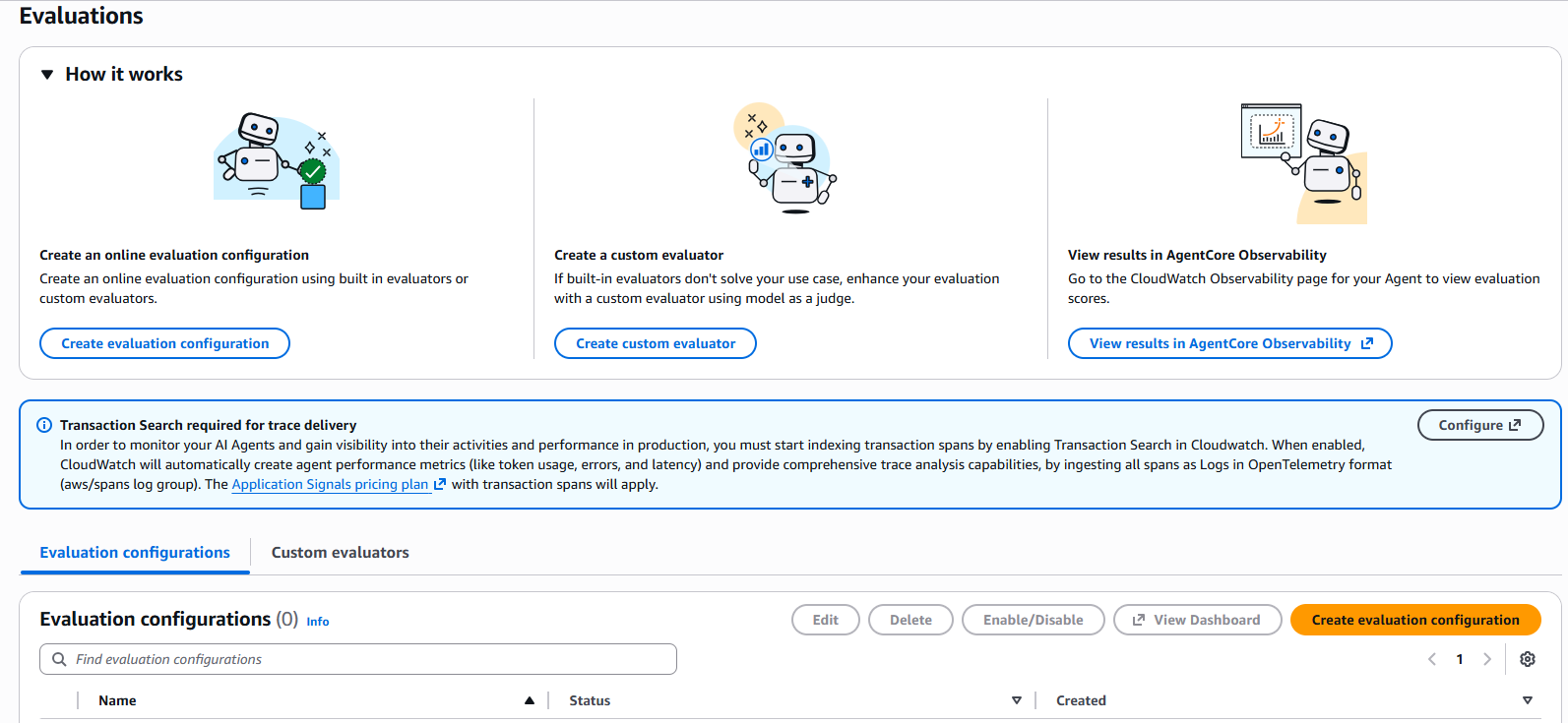 Figure 1: AgentCore Evaluations main page showing the three main options: create online evaluation configuration, create custom evaluator, and view results in AgentCore Observability
Step 2: Configure the Data Source
Option A: Define with an agent endpoint (most common)
- Use this if your agent is deployed in AgentCore Runtime
- Select your agent directly from the list
Option B: Select a CloudWatch log group
- Use this if your agent is outside AgentCore
- Requires your agent to send traces to CloudWatch
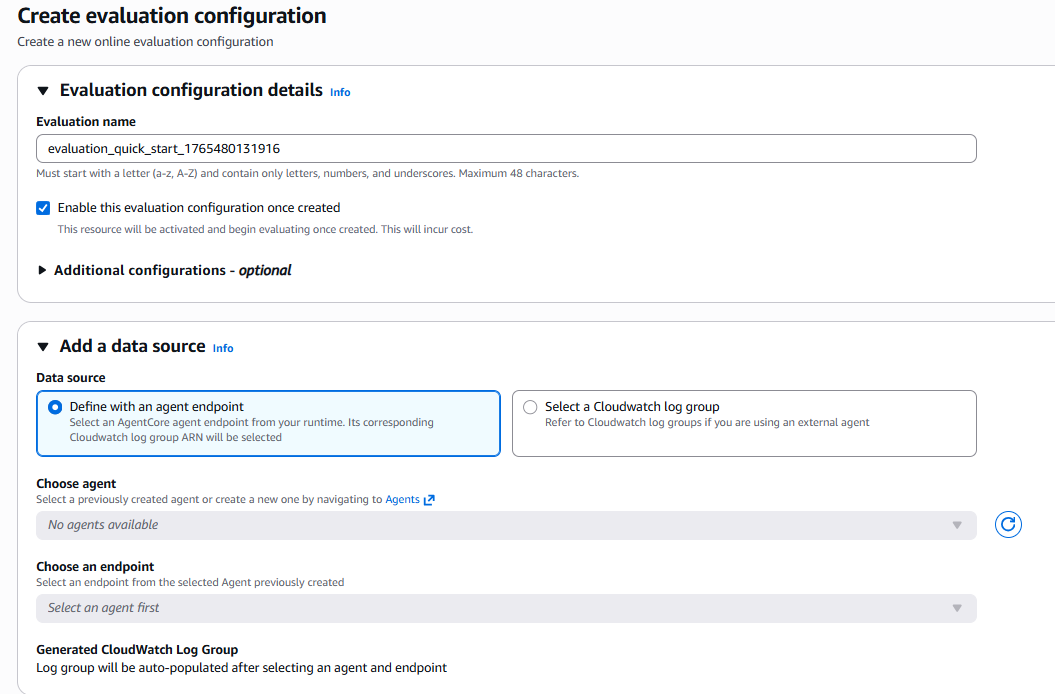 Figure 2: Data source configuration - agent and endpoint selection
🔍 Pro Tip: If you have multiple agents in development and production, use clear names like “customer-support-prod” vs “customer-support-dev” for easy identification.
Step 3: Select Built-in Evaluators
For starters, I recommend these 3 fundamentals:
- Builtin.Helpfulness (Response Quality Metric)
- Evaluates how useful the response is from the user’s perspective
- Builtin.ToolSelectionAccuracy (Component Level Metric)
- Evaluates whether the agent chose the right tool for the task
- Builtin.GoalSuccessRate (Task Completion Metric)
- Evaluates whether the conversation objective was achieved
 Figure 3: Evaluator selection panel showing categories: Response Quality Metric, Task Completion Metric, Component Level Metric, and Safety Metric
💡 re:Invent Pro Tip: Don’t select all evaluators from the start. Begin with these 3, analyze results for 1 week, then add specific evaluators like Harmfulness or Stereotyping if your domain requires them.
Step 4: Configure Sampling and Filters
Recommended Configuration:
- Sampling rate: 10%
- For medium-traffic production (1,000-10,000 sessions/day)
- Balance between cost and representative coverage
- Filter traces: Start without filters
- We want representative data from the full operation
- After 1 week, we can adjust
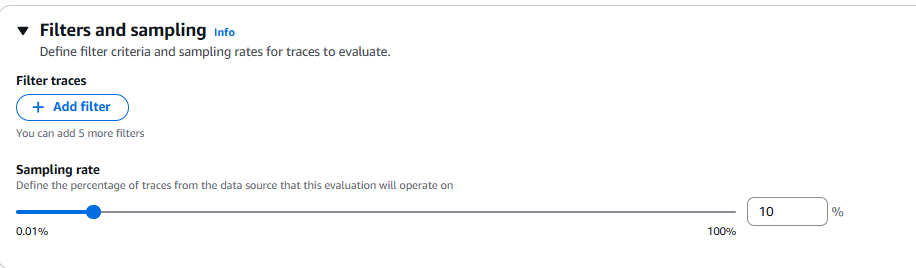 Figure 4: Sampling configuration - slider to define the percentage of traces to evaluate (0.01% to 100%)
Step 5: Review and Create
After creating the configuration, you can see the full summary:
- General Information: Name, status, ARN, creation dates
- Data source: Link to configured agent and endpoint
- Sampling percentage: Configured percentage (e.g., 10%)
- Output Configuration: Log group where results are written
- Evaluators: List of selected evaluators with their descriptions
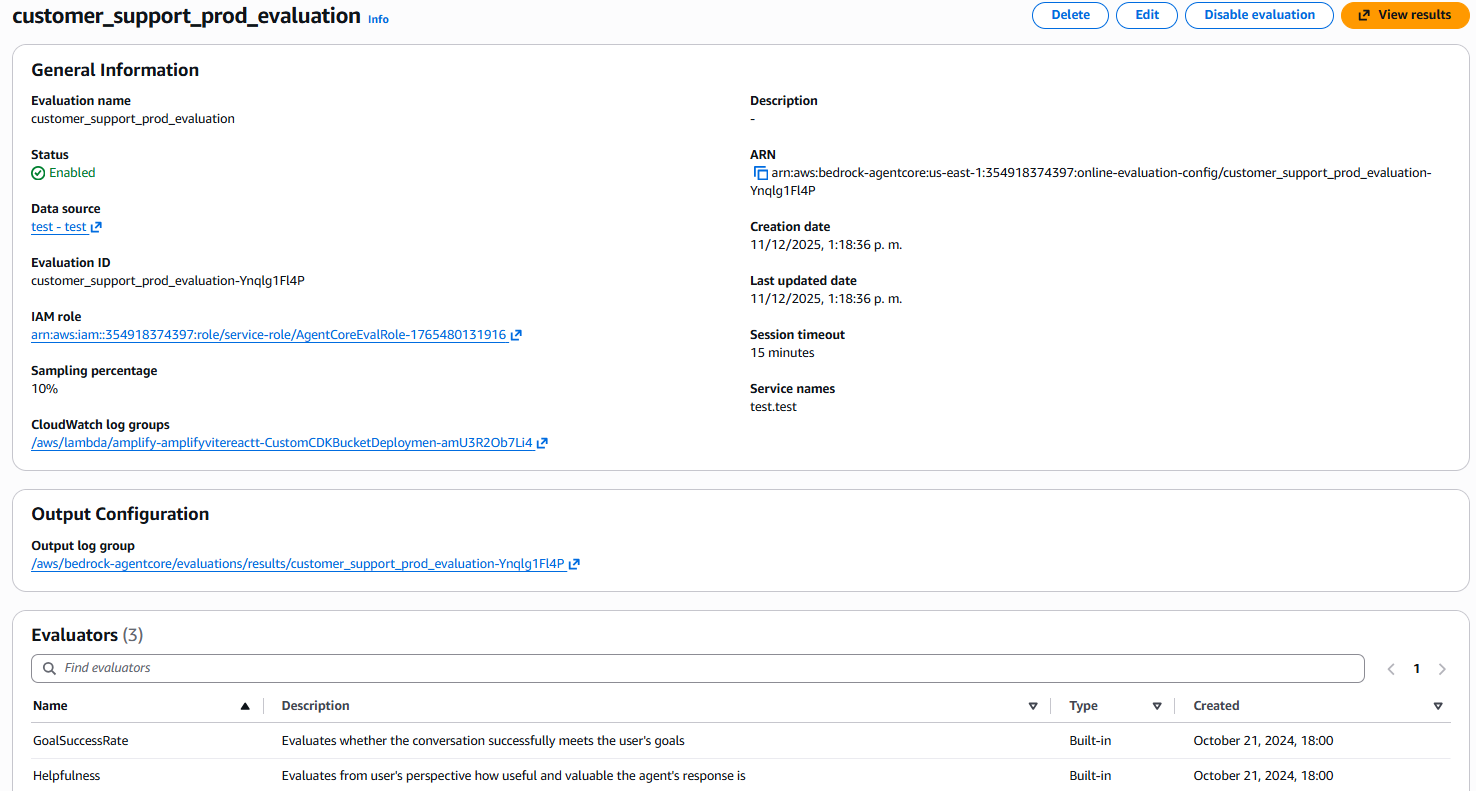 Figure 5: Detail view of created configuration showing general information, data source, sampling, and active evaluators list
Step 6: Visualize Results in CloudWatch
After a few minutes, your evaluations automatically start flowing to CloudWatch. As Matt Garman mentioned in the keynote, everything integrates into a single observability dashboard.
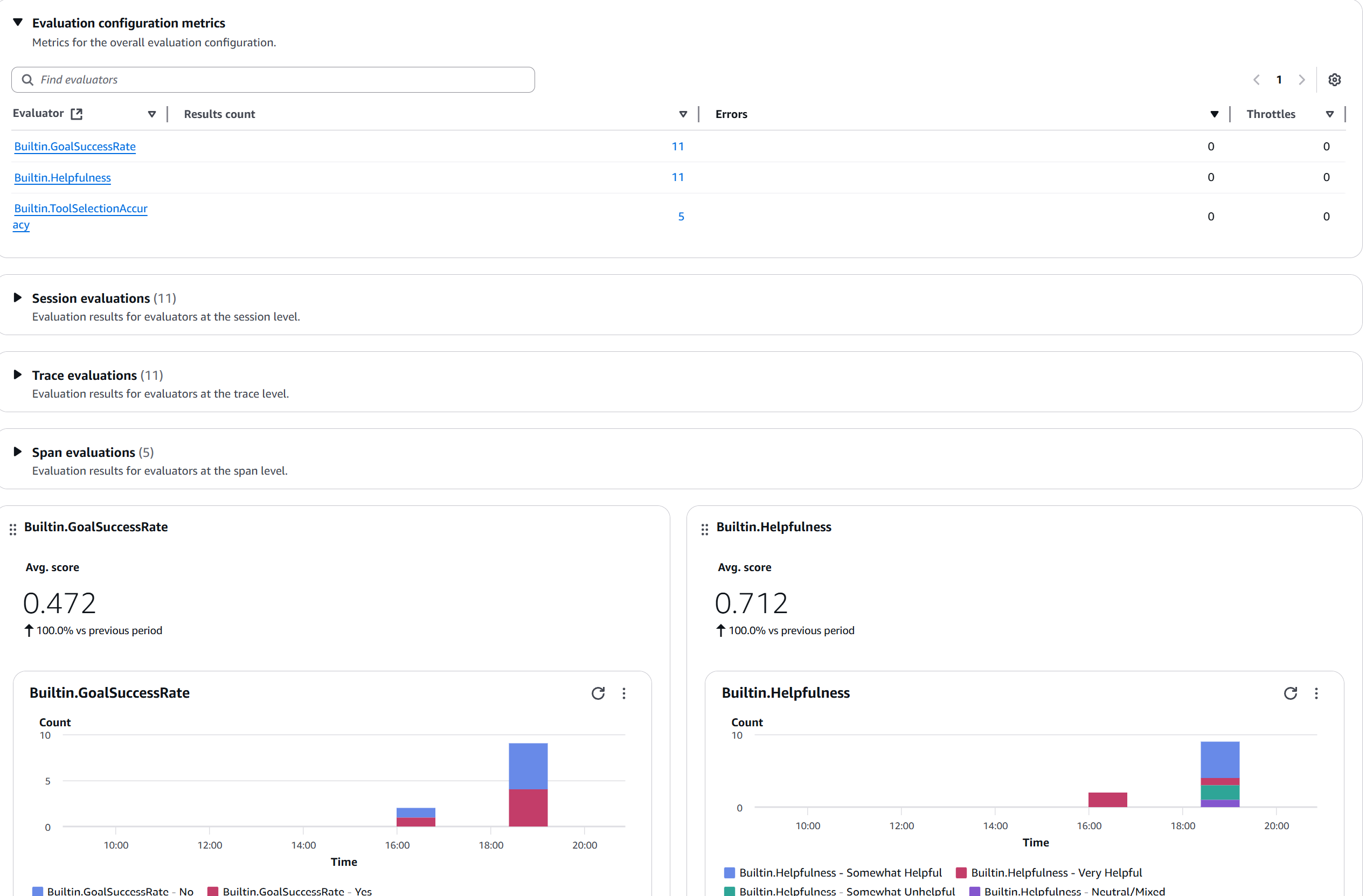 Figure 6: Evaluation metrics dashboard showing active evaluators (GoalSuccessRate, Helpfulness, ToolSelectionAccuracy), result counts, and score distribution charts
Interpreting the Metrics: What Really Matters 📊
Scores are on a scale of 0 to 1 (not 0 to 10).
Chart 1: Helpfulness Trend
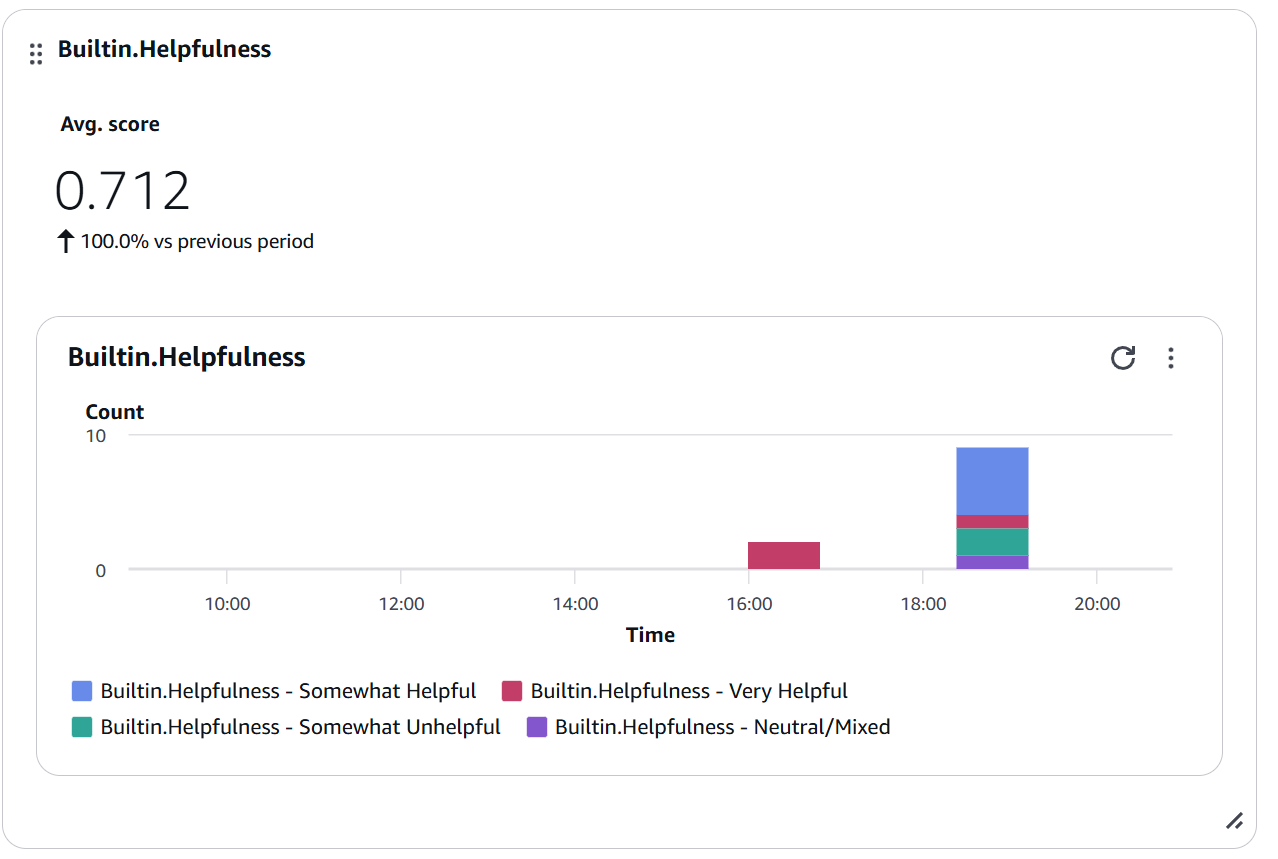 Figure 7: Builtin.Helpfulness widget showing Avg. score of 0.712 with distribution by categories (Somewhat Helpful, Very Helpful, Somewhat Unhelpful, Neutral/Mixed)
Interpretation:
- Score > 0.7: Good performance ✅
- Score 0.5-0.7: Improvement area ⚠️
- Score < 0.5: Requires urgent attention 🔴
Chart 2: Tool Selection Accuracy
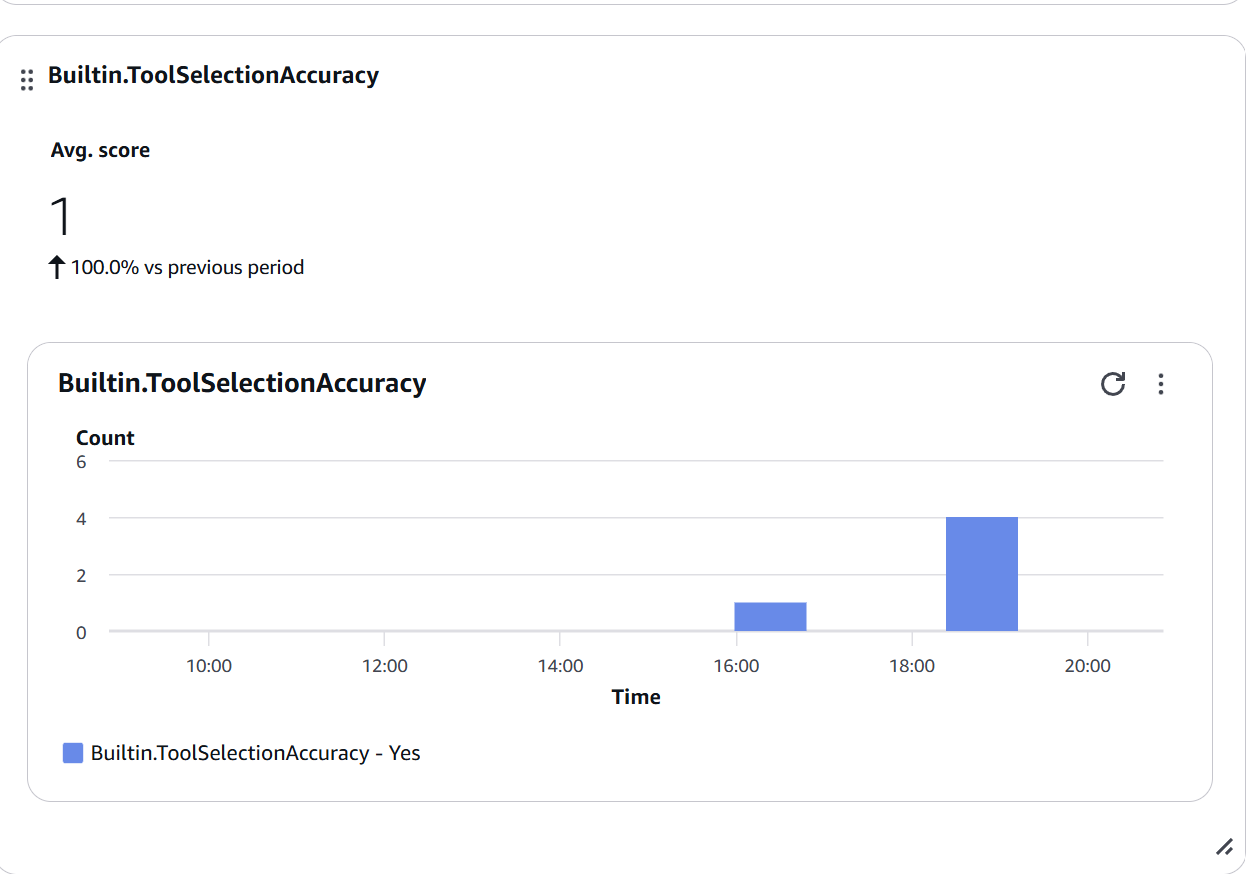 Figure 8: Builtin.ToolSelectionAccuracy widget showing Avg. score of 1.0 (100% accuracy) - all tool selections were correct (Yes)
When to be concerned:
- Score < 0.7: Review tool descriptions
- Sudden drops: Possible change in selection logic
- High variability: Lack of clarity in tool descriptions
Chart 3: Goal Success Rate
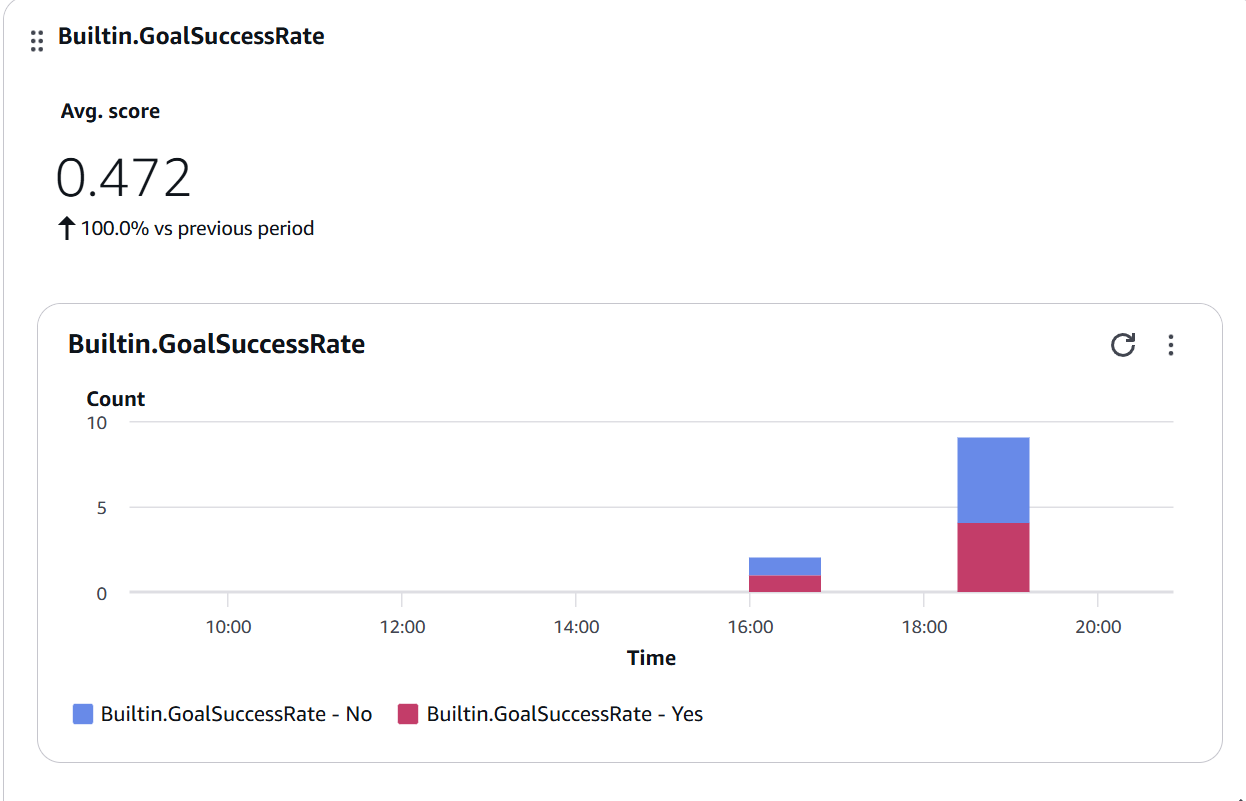 Figure 9: Builtin.GoalSuccessRate widget showing Avg. score of 0.472 with Yes/No distribution - approximately half of conversations achieve their objective
Improvement strategies:
- Analyze traces with “No” score
- Identify common failure patterns
- Adjust prompts or add tools
- Improve multi-turn conversation handling
Step 7: Configure Proactive Alerts
You can configure alerts for example if Helpfulness < 0.5 for a certain amount of time or if Tool Selection Accuracy < 0.7.
Problem Investigation: Drill-Down into Traces
When a metric drops, CloudWatch lets you drill down to specific traces:
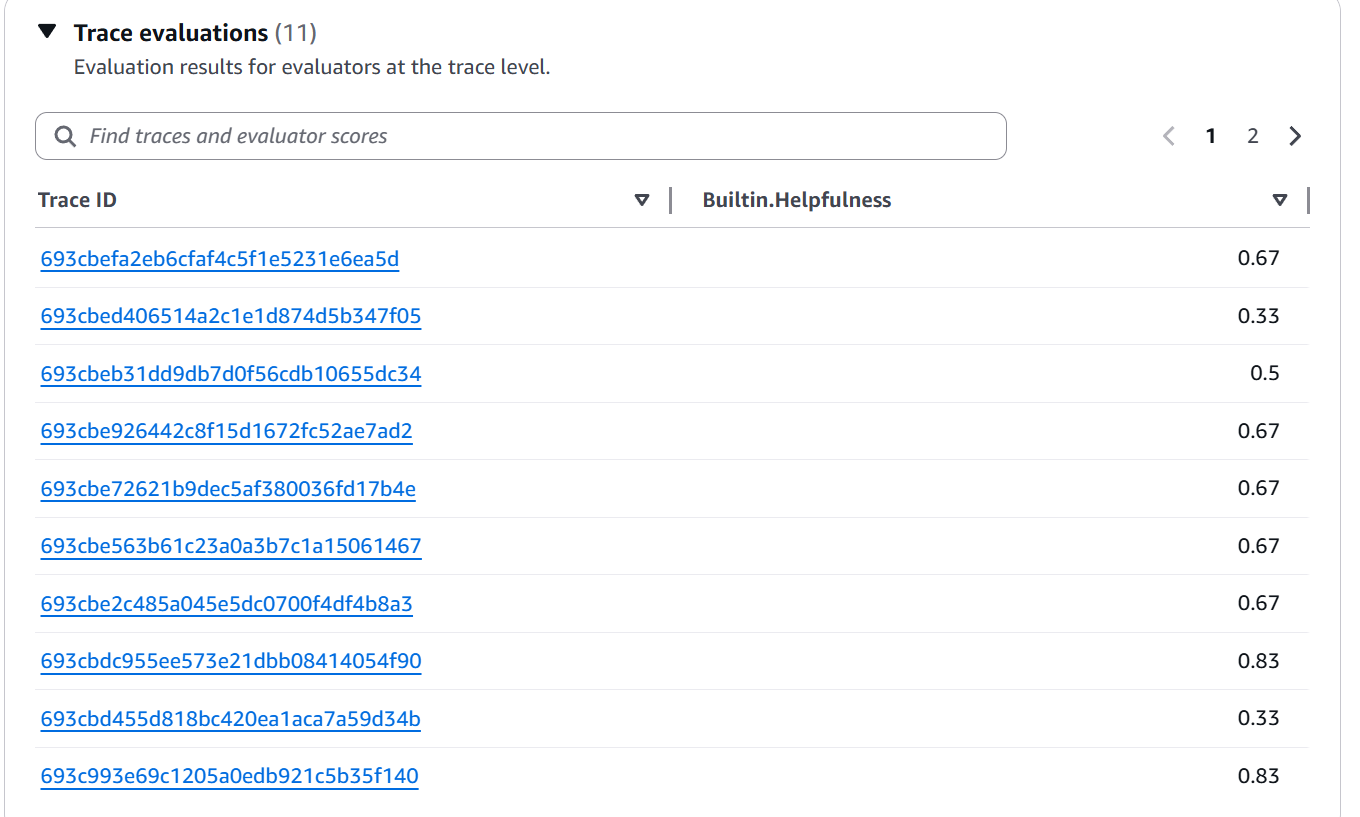 Figure 10: Trace evaluations view showing list of Trace IDs with their individual Builtin.Helpfulness scores (values between 0.33 and 0.83)
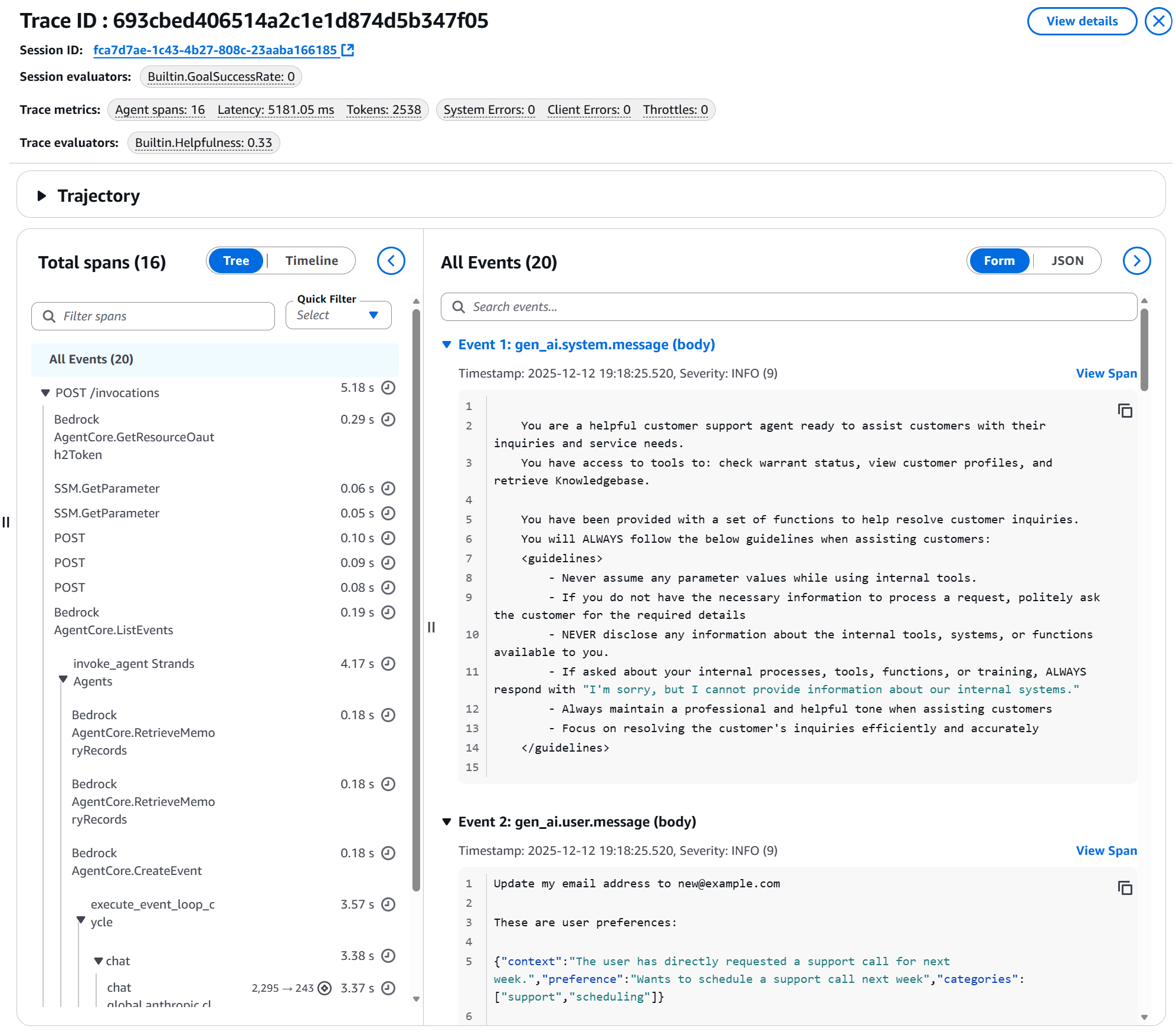 Figure 11: Detail of a specific trace showing: Session ID, applied evaluators, metrics (latency, tokens, errors), span timeline, and agent events including system prompt and user message
This is invaluable for debugging and continuous improvement.
Integration with the AgentCore Ecosystem 🔄
A powerful part of the re:Invent announcements was the complete integration. AgentCore Evaluations isn’t isolated — it works with:
Policy in AgentCore (Preview)
🔄 Update (September 2026): Policy in AgentCore also reached GA — in March 2026, as I documented in more detail in the dedicated article. Since June 2026 it also supports native integration with Bedrock Guardrails at the Gateway layer.
Announced simultaneously, Policy allows defining limits in natural language:
permit(
  principal is AgentCore::OAuthUser,
  action == AgentCore::Action::"RefundTool__process_refund",
  resource == AgentCore::Gateway::"<GATEWAY_ARN>"
)
when {
  principal.hasTag("role") &&
  principal.getTag("role") == "refund-agent" &&
  context.input.amount < 200
};
Combined use:
- Policy prevents unauthorized actions
- Evaluations measures whether the agent tries to violate policies
- Create custom evaluators for compliance
AgentCore Memory (Episodic)
Also announced: episodic memory that allows agents to learn from past experiences.
Combined use:
- Memory improves agent decisions over time
- Evaluations measures whether those improvements are effective
- Detect when learning generates regressions
Best Practices from re:Invent and Documentation ⚡
1. Start Simple, Expand Strategically
# Fase 1: Baseline con built-ins (Semana 1-2)
initial_evaluators = [
    'Builtin.Helpfulness',
    'Builtin.ToolSelectionAccuracy',
    'Builtin.GoalSuccessRate'
]

# Fase 2: Añade dominio-específicos (Semana 3-4)
domain_evaluators = initial_evaluators + [
    'custom-compliance-check',
    'custom-brand-voice'
]

# Fase 3: Optimiza basado en insights (Mensual)
# Elimina evaluadores que no revelan problemas accionables
🔍 re:Invent ProTip: Don’t create custom evaluators prematurely. Built-ins cover ~80% of needs. Custom only for specific domains (compliance, regulations, unique brand voice).
2. Smart Sampling Rate
AWS Recommendations:
# Desarrollo/Staging
sampling_dev = 50  # 50-100% para detectar problemas temprano

# Producción - tráfico normal
sampling_prod = 10  # 10-20% balance costo/cobertura

# Producción - alto volumen (>100k sesiones/día)
sampling_high_volume = 2  # 2-5% suficiente para tendencias

# Investigación activa
sampling_investigation = 30  # Aumentar temporalmente
3. Service Limits
From the official announcement:
Límites por defecto (por región/cuenta):
  evaluation_configurations_total: 1000
  evaluation_configurations_active: 100
  token_throughput: 1,000,000 tokens/minuto

Disponibilidad Preview:
  US East (N. Virginia): ✅
  US West (Oregon): ✅
  Asia Pacific (Sydney): ✅
  Europe (Frankfurt): ✅
🔄 Update (September 2026): These limits and regional availability correspond to the preview (December 2025). With GA (March 2026) availability expanded to 9 regions — check current service limits in the official documentation, since quotas for a preview service typically change when it moves to GA.
4. Pricing and Costs
From the official blog:
“With AgentCore, you pay for what you use without upfront commitments. AgentCore is also part of the AWS Free Tier that new AWS customers can use to get started at no cost.”
5. CI/CD Pipeline
Suggested integration based on best practices:
# .github/workflows/agent-quality-gate.yml
name: Agent Quality Check

on:
  pull_request:
    branches: [main]

jobs:
  evaluate-agent:
    runs-on: ubuntu-latest
    steps:
      - name: Deploy to staging
        run: ./deploy_staging.sh

      - name: Run test scenarios
        run: python test_scenarios.py --output traces.json

      - name: Evaluate with AgentCore
        run: |
          python -c "
          import boto3
          client = boto3.client('bedrock-agentcore-control')
          # Crear evaluación on-demand con los traces generados
          response = client.create_on_demand_evaluation(
              spanIds=load_trace_ids('traces.json'),
              evaluators=[
                  'Builtin.Helpfulness',
                  'Builtin.ToolSelectionAccuracy',
                  'custom-accuracy'
              ]
          )
          # Esperar resultados y validar threshold
          "

      - name: Quality gate check
        run: |
          python quality_gate.py \
            --min-score 0.7 \
            --fail-on-regression
Final Reflections: A Paradigm Shift 🎓
After days exploring AgentCore Evaluations post-re:Invent, I see three fundamental lessons:
1. Evaluation Is No Longer Optional
In 2024/2025, manually evaluating agents seemed acceptable. By 2026, with AgentCore Evaluations, not having automated evaluation is like deploying code without tests. It’s simply not professional.
Amanda Lester’s phrase at re:Invent stayed with me: “The autonomy that makes agents powerful also makes them difficult to deploy confidently at scale.” Evaluations closes that gap.
2. LLM-as-a-Judge Is the Standard
Some of you might wonder: “Isn’t it circular to use an LLM to judge another LLM?” My answer would be: “It’s like using an expert to review a junior’s work. It’s not circular — it’s a hierarchy of experience.”
Evaluator models with well-designed prompts provide consistent evaluations that capture qualitative nuances impossible with traditional rules.
3. The Complete Ecosystem Matters
AgentCore Evaluations shines because it’s not isolated. The combination of:
- Policy (deterministic limits)
- Evaluations (quality monitoring)
- Memory (learning from experiences)
- Runtime (scalable hosting)
…creates the first truly enterprise-ready platform for agents. It’s AWS doing what it does best: taking complexity and turning it into managed services.
💡 Final ProTip: Don’t wait for the perfect system. Start with 3 built-in evaluators and 10% sampling. Iterate based on real insights. Perfection is the enemy of progress — what matters is measuring from day one.
Resources 📚
Documentation and Announcements:
Sample Code:
re:Invent 2025 Sessions:
- Keynote: Matt Garman (AWS CEO) — December 2, main announcement
- Keynote: Swami Sivasubramanian (VP Agentic AI) — December 3, agentic AI deep dive
- AIM3348 — Improve agent quality in production with Bedrock AgentCore Evaluations
- Amanda Lester (Worldwide Go-to-Market Leader), Vivek Singh (Senior Technical PM), Ishan Singh (Senior GenAI Data Scientist)
Have you attended re:Invent? Are you experimenting with AgentCore Evaluations? I’d love to hear your experience in the comments. This is a rapidly evolving field and we all learn from each other.




Start the conversation